When is it calculated:
Price recommendation process:
- Pre-process custom functions.
- Pricing strategy - Pricing rule.
- Pricing limits: checked and applied.
- Rounding.
- Post-process custom functions.
*Notice that the price might change again after limits/rounding are calculated.
How is it calculated:
Every strategy can have Pricing Limits. They appear in 'Pricing strategy', in 'Pricing Limits' tab.
Once a limit is met, there are two options:
- ignore the recommendation completely - the recommendation will be thesame as the shelf price (This will also be mentioned in the pricinig strategy explanation line)
- adjusting to the limit.
Another option is to turn on 'if limits are exceeded, skip to the next rule' (appears in 'Strategy Settings' tab). In case a limit has been met, instead of taking an action, it will continue to next rule. for more detailed information see here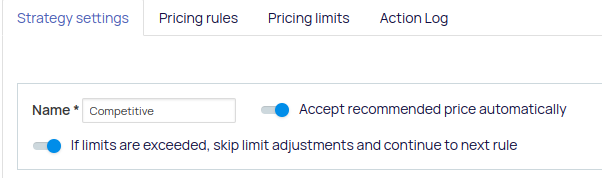
Once a limit has been met, the process continues straight to rounding or it continues to the next rule, if the toggle above is active.
For example:
in the following image, if the price is below 5% margin, we will not check the maximum price limits. and the recommendation will be ignored.
* The maximum limit takes priority when shelf price limits are defined.
* When the maximum limit is lower than the minimum limit:
This situation should be avoided.
If the price is lower than the minimum limit, the price is adjusted or ignored according to the set limit.
*In case that the limit variable is not included in the product information:
The limit check will not be activated. As a result, the product will not receive a new recommendation. Instead, the recommendation will be assigned the value of the shelf price.
Pricing Strategy will display : "variable name" is missing - cannot activate "minimum limit", price unchanged.
Rounding:
The 'Price Rounding' option is available under 'Pricing Limits' in 'Pricing Strategy', at the bottom of the page.
Press 'Add price rounding definitions' to add price rounding.

Round price according to one of these options:
- 'Next' will round up.
- 'Previous' will round down.
- 'Closest' will round up or down according to which option is closest to the recommendation price.
For example:
If the recommendation price is 46 and suffix is 9,
Next will be 49, previous will be 39, closest will be 49(since it is closer to 46 than 39).

Adjust to one of these options:
- 'to a specific suffix', a specific value you wish to set.
For example, The original recommendation was 102.47; you set 'next' and '0.5' as the suffix value. The result will be 102.5 after rounding.
- 'to N decimal places', the number of decimal places you wish to set.
For example, The original recommendation was 102.47, and you set 'next' and '1 decimal places'. The result will be 102.5 after rounding.

Apply to any price or price in range.
*Notice that:
- Price rounding applies after 'pricing limits'.
- After pricing rounding, the recommendation price goes through post-process functions. This can cause a recommendation price that is not in accordance with the limits and rounding.
- You can also set up a margin or limit per rule inside the strategy, to read more about this feature, please check our guide here
Comments
0 comments
Please sign in to leave a comment.