Introduction
This document provides a comprehensive overview of the recent enhancements to our Promotions tool. These changes aim to increase user control, improve integration capabilities, and streamline workflow efficiency. The documentation is structured to help technical and non-technical users effectively understand and leverage these new features.
Table of Contents:
1. Enhancement Overview
The following enhancements have been made to the Promotions tool:
- Edit Base Price: Users can now directly edit the "base price" field in the Promotions UI, offering more flexibility.
- API Promotion Updates: Updating promotions through our API is now available for seamless system integrations.
- Audit Log Tracking: The creation of promotions is now tracked in the Audit log for transparency.
- Increased Upload Capacity: The upload limit for promotions has been raised from 5,000 to 25,000 items to support larger data sets.
- Smarter File Uploads: Uploaded files will now override current promotion items, and published items that don't appear in the uploaded file will require manual confirmation for deletion.
2. Detailed Feature Descriptions
2.1 Edit Base Price in Promotions UI
Feature Overview
This enhancement allows users to edit the "base price" field directly in the Promotions UI, giving more control over pricing strategies.
Functionality Details
- UI Location: Users can now edit the base price field directly in the promotion creation/edit screen.
- Purpose: Provides flexibility to adjust base prices quickly.
- User Impact: Simplifies the process of modifying the values you would like to revert to.
How to Use
- Access the Promotions tool.
- Select a promotion.
- Modify the base price directly within the UI.
2.2 API Promotion Updates
Feature Overview
Updating promotions through the API is now supported, allowing for automated changes via external systems.
Functionality Details
- API Endpoint: API now supports updating promotion details for published items.
- Purpose: Enables seamless integration with external systems.
- User Impact: Automation of promotion updates.
API Documentation
-
Method:
PUT /promotions/{gid} - Parameters: Promotion ID and the updated promotion data in JSON format.
How to Use
- Call the PUT /promotions/{gid} endpoint.
- Pass the necessary promotion data for updates.
2.3 Audit Log Tracking for API Promotion Creation
Feature Overview
Creating promotions via API is now logged in the system’s Audit log for full traceability.
Functionality Details
- Audit Log Addition: promotion creation is now logged (both for UI & API sources).
- Purpose: Provides accountability and transparency.
How to Use
- Access the system's Audit log.
- View entries for promotions created.
2.4 Increased File Upload Capacity
Feature Overview
The file upload capacity has increased from 5,000 to 25,000 items to support large-scale promotions better.
Functionality Details
- Previous Limit: 5,000 items.
- New Limit: 25,000 items.
- Purpose: Supports larger datasets and improves workflow efficiency.
How to Use
- Upload a CSV file with up to 25,000 items to the Promotions tool.
- The system will handle the larger file upload.
2.5 Smarter File Uploads (Override and Confirm Delete)
Feature Overview
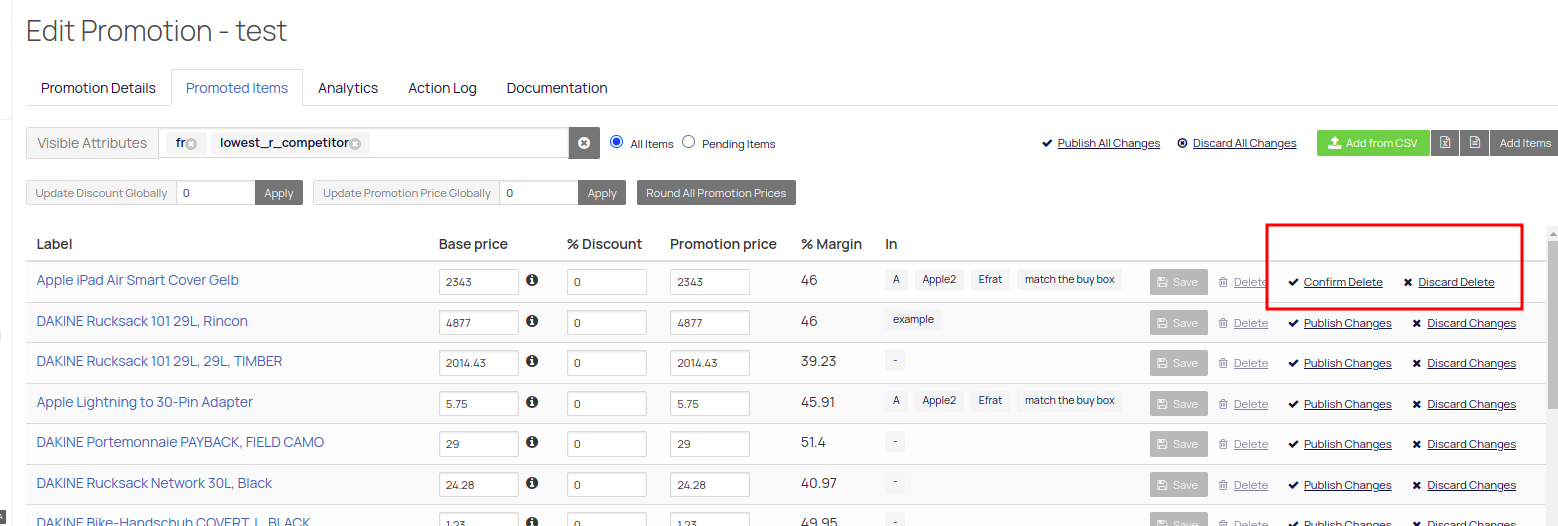
Uploaded files will overwrite existing items, and any previously "published" items not found in the uploaded file will require manual confirmation for deletion by clicking the 'Confirm Delete' button.
Functionality Details
- Override Functionality: New file uploads replace existing promotion items.
- Confirm Delete: Items included in the promotion but missing from the uploaded file will require manual confirmation for deletion. Like so:
How to Use
- Prepare and upload your CSV file.
- The system will update promotions and flag missing items as 'Confirm Delete'.
Comments
0 comments
Please sign in to leave a comment.