July 2026
July 2, 2026
Improvement
New Pricing Parameter Sheet
Create, edit and manage parameter sheets faster,
using the redesigned interface, the new setup wizard and the
improved validation logic.
What this means for you:
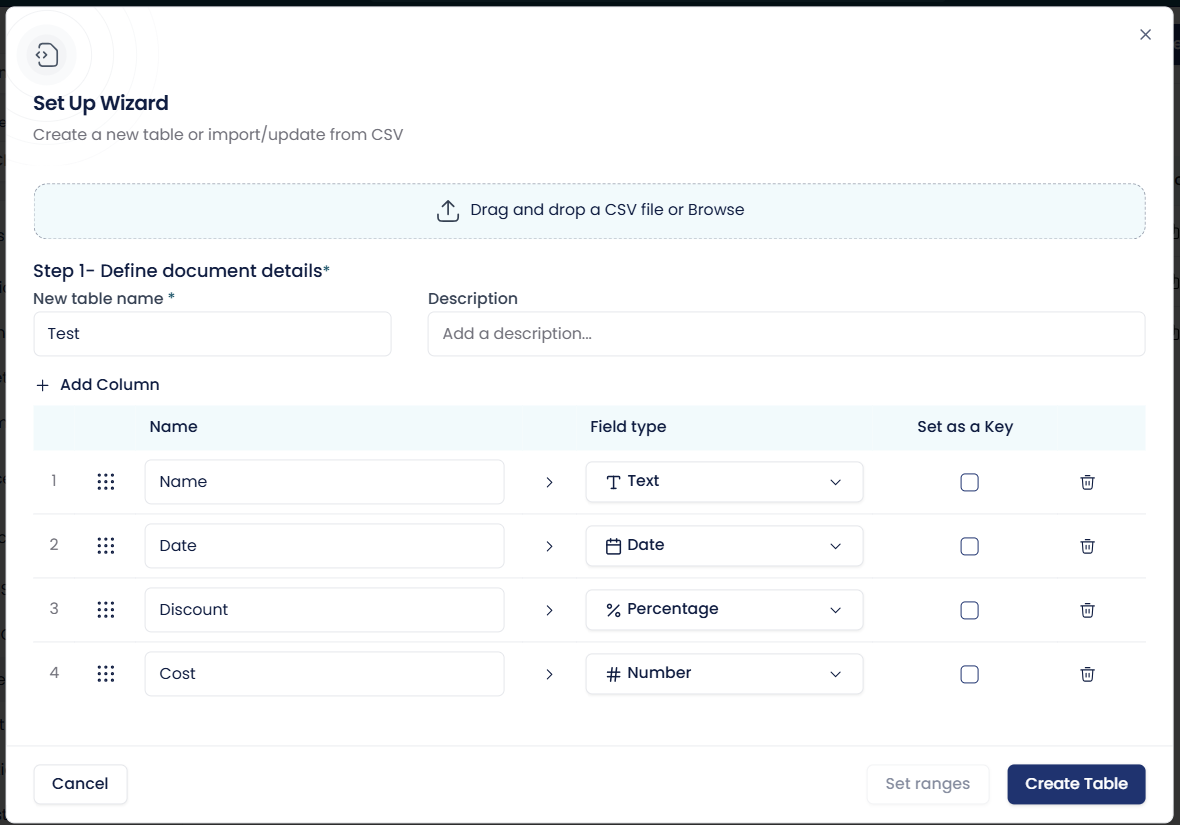
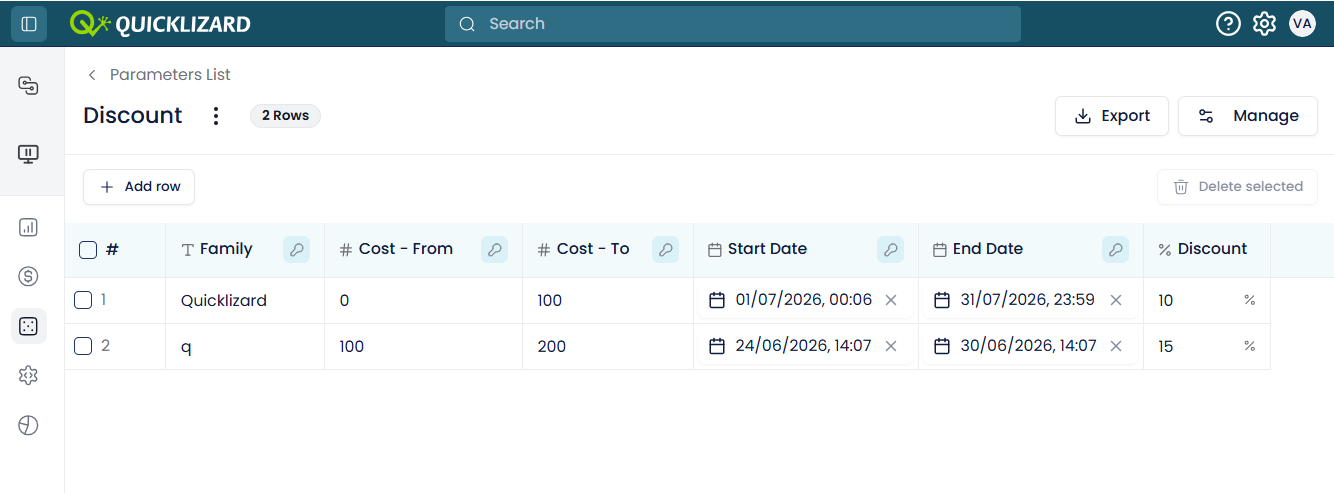
🔹New Setup Wizard. Create a parameter sheet from scratch in just a few steps - define the table name, description, columns (text, number, date and now also percentage), keys and ranges. Sheets now support up to 100,000 rows.
🔹Improved Error Handling. New validation logic makes errors easy to spot and fix. Sheets containing errors cannot be saved, so invalid data never reaches the pricing cycle.
🔹Stay in Place After Saving. After saving, you remain inside the parameter sheet so you can keep editing - instead of being sent back to the parameter sheets list.
🔹Better Day-to-Day Usability. Drag-and-drop to rearrange columns, collapse columns for focus, rename sheets (with an alert when custom functions are impacted), and restructure the table from a single modal.
Read this article for more details about the Pricing Parameter Sheet.
What this means for you:
🔹New Setup Wizard. Create a parameter sheet from scratch in just a few steps - define the table name, description, columns (text, number, date and now also percentage), keys and ranges. Sheets now support up to 100,000 rows.
🔹Improved Error Handling. New validation logic makes errors easy to spot and fix. Sheets containing errors cannot be saved, so invalid data never reaches the pricing cycle.
🔹Stay in Place After Saving. After saving, you remain inside the parameter sheet so you can keep editing - instead of being sent back to the parameter sheets list.
🔹Better Day-to-Day Usability. Drag-and-drop to rearrange columns, collapse columns for focus, rename sheets (with an alert when custom functions are impacted), and restructure the table from a single modal.
Read this article for more details about the Pricing Parameter Sheet.
Improvement
Price Change Recommendations Graph Now Interactive
Move from insight to action in one click - the
values on the x-axis of the
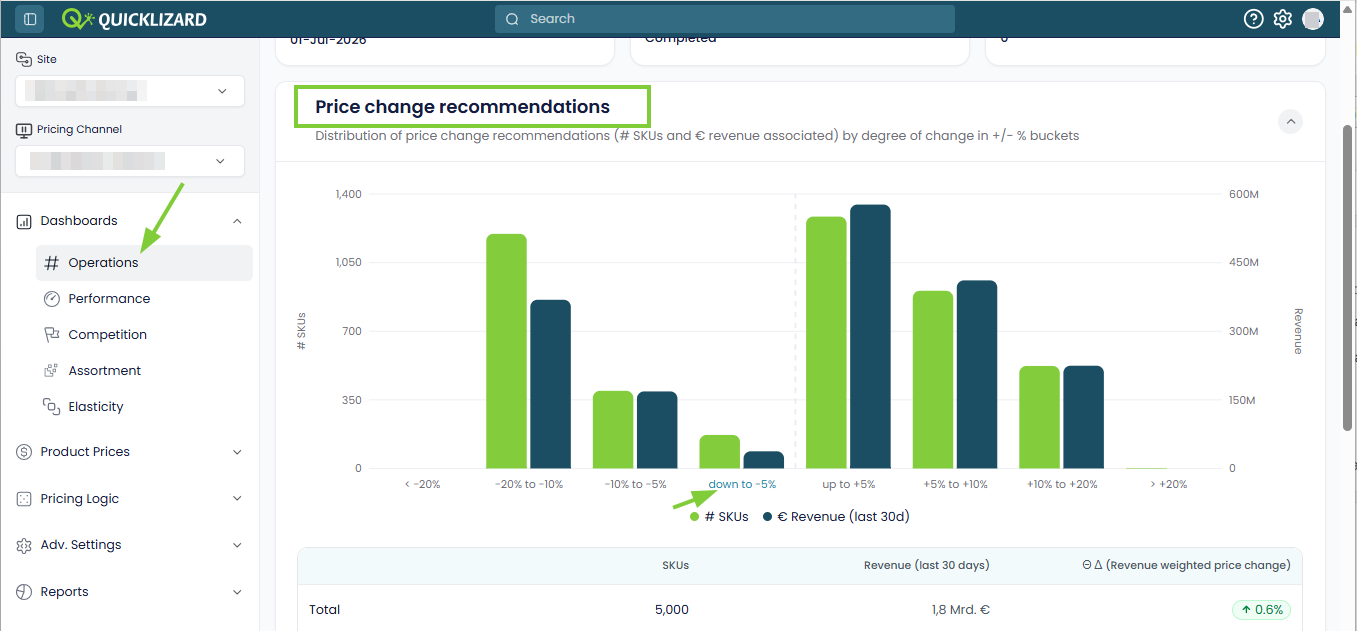
Price Change Recommendations graph are now clickable.
What this means for you:
🔹One-Click Drill-Down. Click any value on the x-axis to jump directly to the Price Recommendations Page, with the matching filters already applied - no more manual filter setup.
🔹Available Where You Need It. The interactive x-axis works both in the Operations Dashboard and in the Chart View of the Price Recommendations Page.
What this means for you:
🔹One-Click Drill-Down. Click any value on the x-axis to jump directly to the Price Recommendations Page, with the matching filters already applied - no more manual filter setup.
🔹Available Where You Need It. The interactive x-axis works both in the Operations Dashboard and in the Chart View of the Price Recommendations Page.
Improvement
Enhanced Numeric Filters
Get more precise control over your data, with
new exclusion options for numeric filters.
What this means for you:
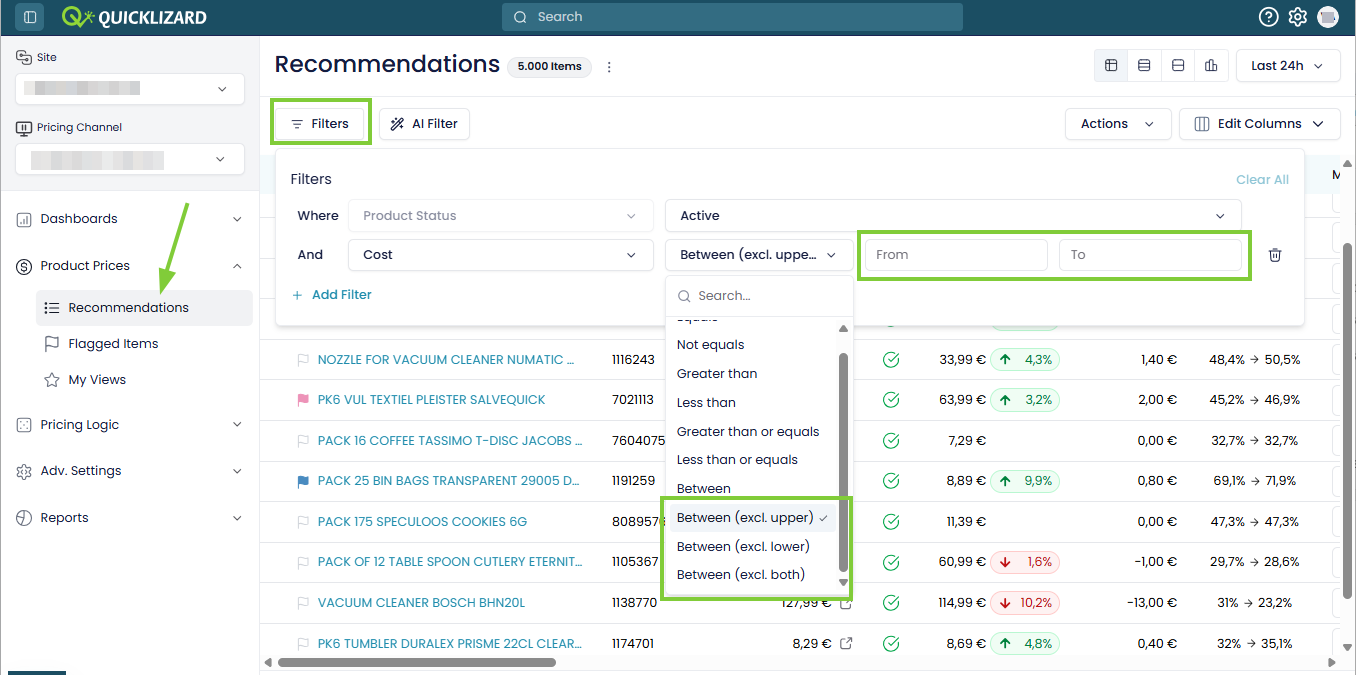
🔹Granular Range Control. Beyond the existing "between" filter (which always included both upper and lower bounds), you can now exclude the upper bound, the lower bound, or both - to match exactly the data range you need.
🔹Available Across the Platform. The new exclusion options are available for all numeric attributes, on all pages that allow filtering of data.
What this means for you:
🔹Granular Range Control. Beyond the existing "between" filter (which always included both upper and lower bounds), you can now exclude the upper bound, the lower bound, or both - to match exactly the data range you need.
🔹Available Across the Platform. The new exclusion options are available for all numeric attributes, on all pages that allow filtering of data.
July 1, 2026
New
Elasticity 2.0 Model and Elasticity Dashboard
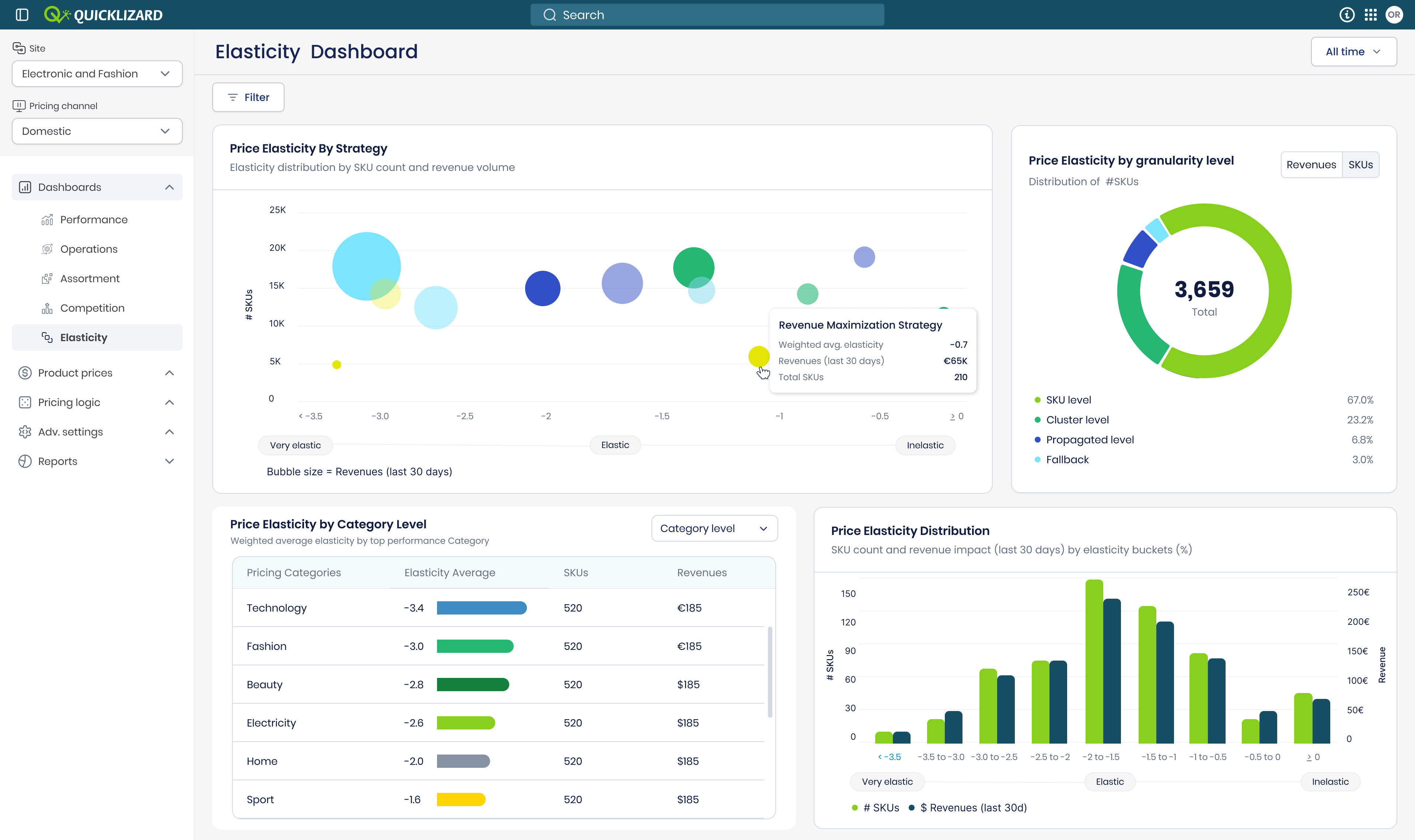
Use the new Elasticity Dashboard to map your
portfolio's revenue risk, protect fragile revenue and identify
safe zones to expand margins.
What this means for you:
🔹Powered by Elasticity 2.0. The new Elasticity 2.0 model offers 100% coverage across your entire product catalog.
🔹Spot High-Risk Revenue at a Glance. A bubble chart plots price sensitivity against SKU density (with bubble size representing 30-day revenue), instantly surfacing high-revenue segments that are vulnerable to automated price hikes.
🔹Find Safe Margin Opportunities. The Price Elasticity by Category Level table ranks revenue-weighted average elasticity across category levels 1-5, helping you drill down into inelastic subcategories where you can safely raise prices.
🔹Verify Your Data Confidence. A granularity donut chart shows how much of your elasticity is backed by SKU-level history versus cluster, propagation or fallback - so you know exactly how confident to be in your automation.
Please contact your CSM if you are interested in enabling the Elasticity Dashboard.
What this means for you:
🔹Powered by Elasticity 2.0. The new Elasticity 2.0 model offers 100% coverage across your entire product catalog.
🔹Spot High-Risk Revenue at a Glance. A bubble chart plots price sensitivity against SKU density (with bubble size representing 30-day revenue), instantly surfacing high-revenue segments that are vulnerable to automated price hikes.
🔹Find Safe Margin Opportunities. The Price Elasticity by Category Level table ranks revenue-weighted average elasticity across category levels 1-5, helping you drill down into inelastic subcategories where you can safely raise prices.
🔹Verify Your Data Confidence. A granularity donut chart shows how much of your elasticity is backed by SKU-level history versus cluster, propagation or fallback - so you know exactly how confident to be in your automation.
Please contact your CSM if you are interested in enabling the Elasticity Dashboard.
Improvement
Chosen Competitor in Decision Details
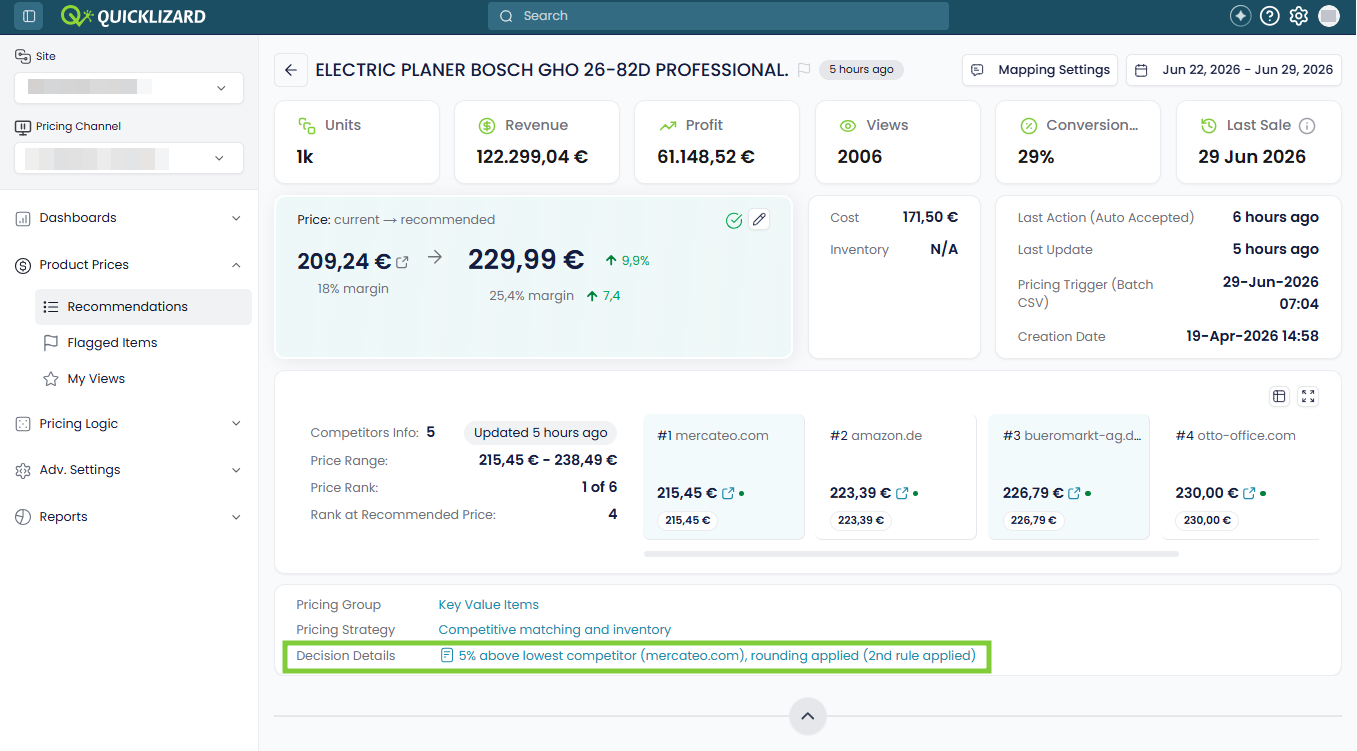
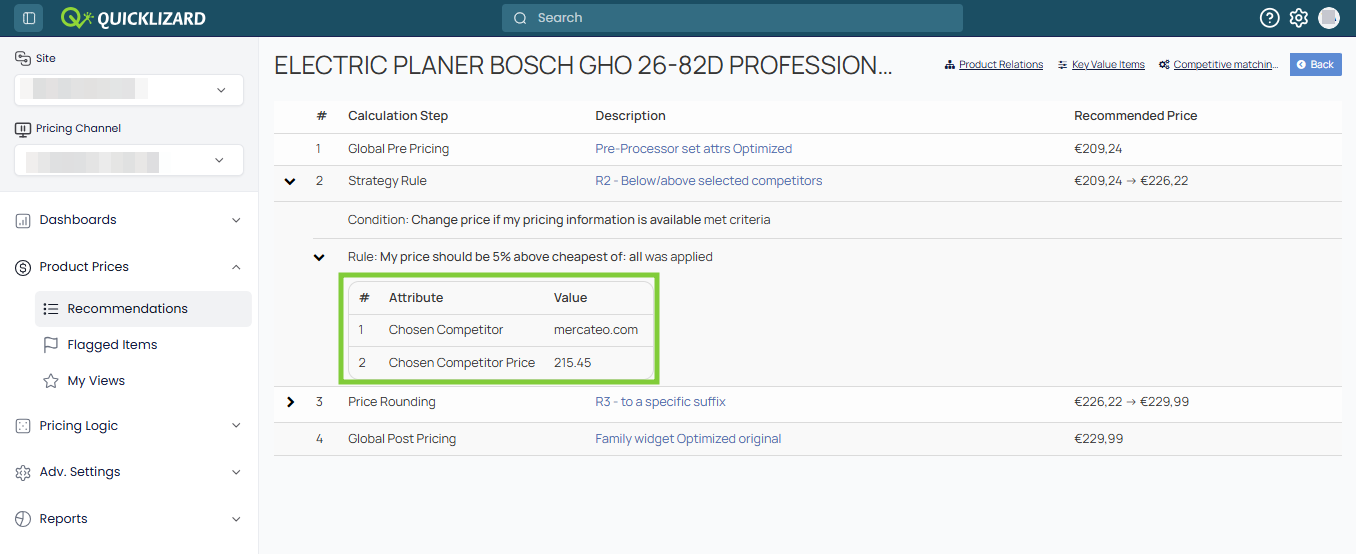
Easily see which competitor was used in your
pricing strategy, with the chosen competitor and price now visible
directly in the Decision Details.
What this means for you:
🔹Full Transparency Into Competitor-Based Strategies. The Decision Details now display the name and price of the competitor that was actually used in the strategy logic.
What this means for you:
🔹Full Transparency Into Competitor-Based Strategies. The Decision Details now display the name and price of the competitor that was actually used in the strategy logic.
May 2026
May 20, 2026
New
AI Insights as Built-In Attributes
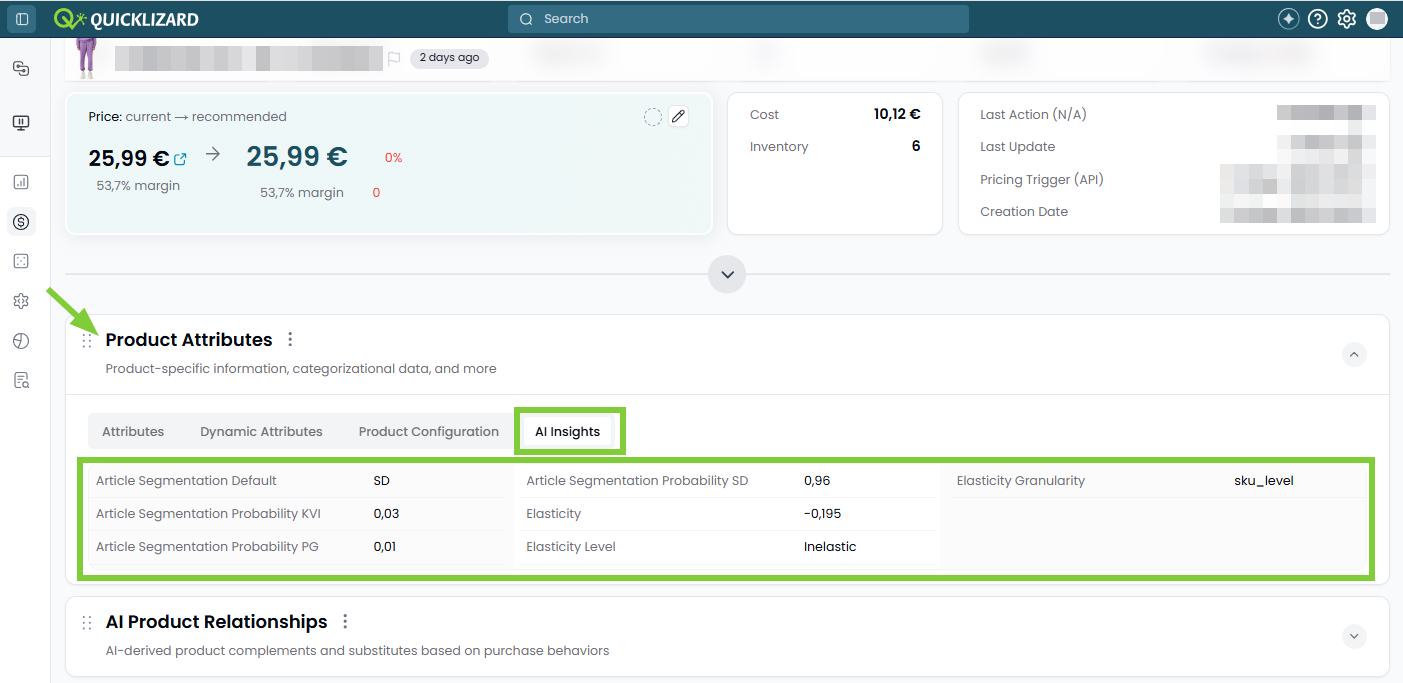
AI-calculated attributes are now available as
built-in attributes, giving you a single place
to access elasticity and article segmentation insights right
where you make pricing decisions.
What this means for you:
🔹Seamless Experience. Treat AI attributes like any other attribute on the Pricing Recommendations Page, and use them in filters, for sorting and to show/hide as a column. The AI attributes are refreshed during the pricing cycle.
🔹Dedicated "AI Insights" Tab. A new tab on the Product Description Page consolidates all AI-driven attributes for the SKU, giving instant visibility into how the data science models interpret your assortment.
Please contact your CSM if you are interested in enabling the AI Insights.
What this means for you:
🔹Seamless Experience. Treat AI attributes like any other attribute on the Pricing Recommendations Page, and use them in filters, for sorting and to show/hide as a column. The AI attributes are refreshed during the pricing cycle.
🔹Dedicated "AI Insights" Tab. A new tab on the Product Description Page consolidates all AI-driven attributes for the SKU, giving instant visibility into how the data science models interpret your assortment.
Please contact your CSM if you are interested in enabling the AI Insights.
New
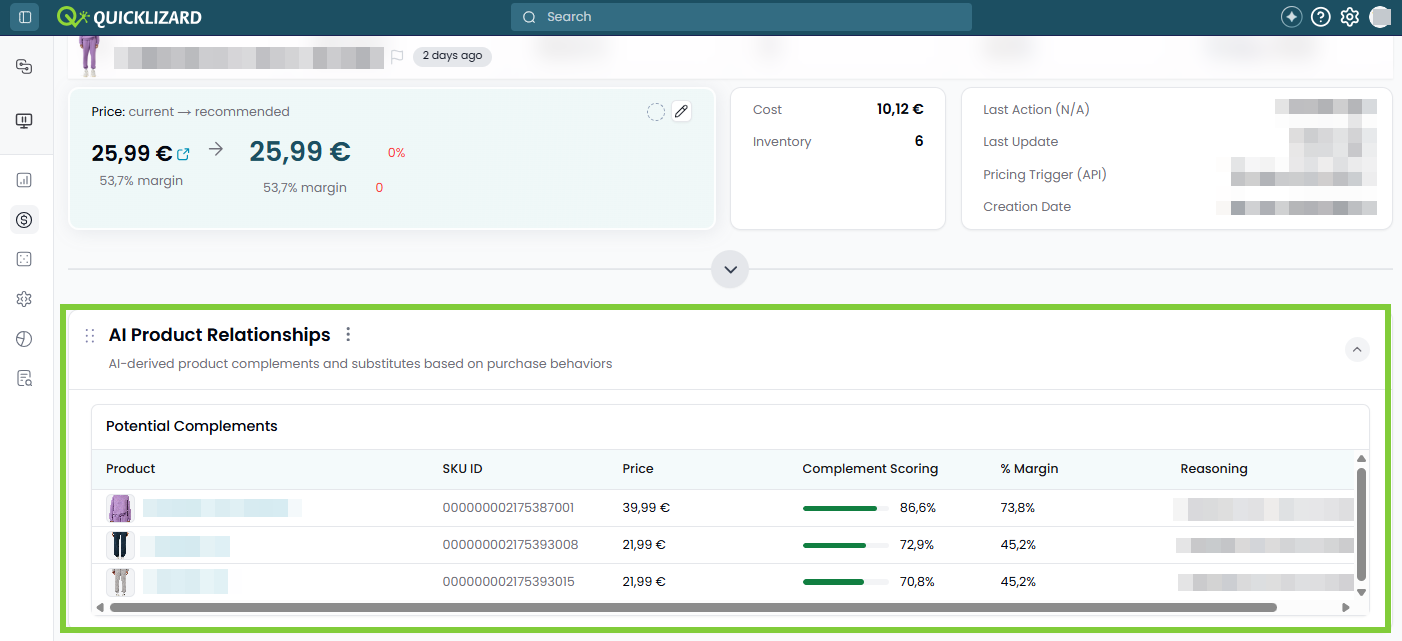
AI Product Relationship Widget - available in Beta
Discover which of your products are frequently
purchased together, with the new
AI Product Relationship widget on the Product
Description Page. This insight into complementary items is powered
by transaction-level basket analysis.
What this means for you:
🔹Transparent Scoring & Reasoning. Hover over any complement to see the detailed reasoning behind the shown score, so you can quickly evaluate why two items were paired.
🔹Powered by Transactional Data. The model uses historical basket analysis to identify items frequently sold together, making transaction-level data feeds a prerequisite for unlocking this capability.
🔹Beta - Insights Only. Relationships are surfaced as potential complements and do not directly impact pricing or strategies.
What this means for you:
🔹Transparent Scoring & Reasoning. Hover over any complement to see the detailed reasoning behind the shown score, so you can quickly evaluate why two items were paired.
🔹Powered by Transactional Data. The model uses historical basket analysis to identify items frequently sold together, making transaction-level data feeds a prerequisite for unlocking this capability.
🔹Beta - Insights Only. Relationships are surfaced as potential complements and do not directly impact pricing or strategies.
May 6, 2026
New
Color-Coded SKU Flagging
Use a color-coded flag to keep your most important
SKU's front-and-center within your active pricing environment.
What this means for you:
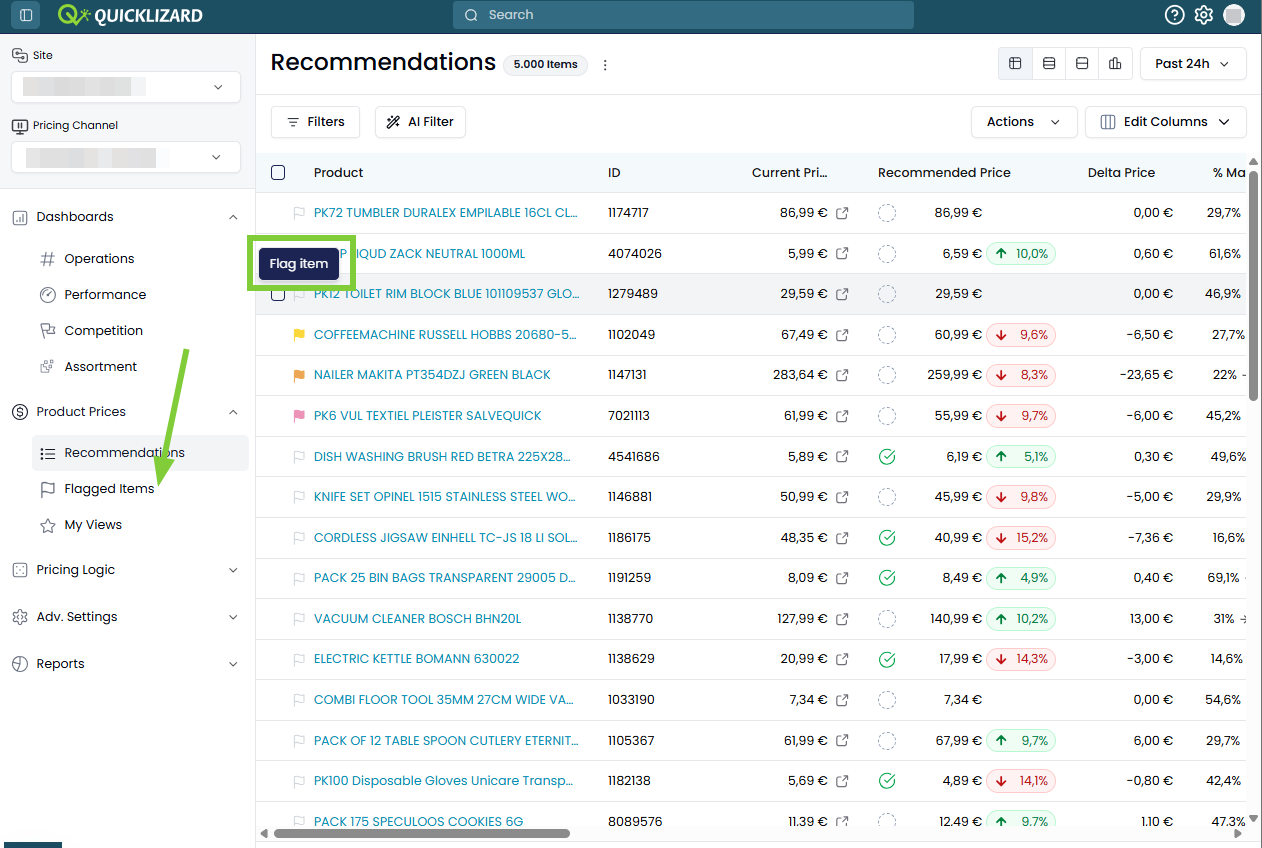
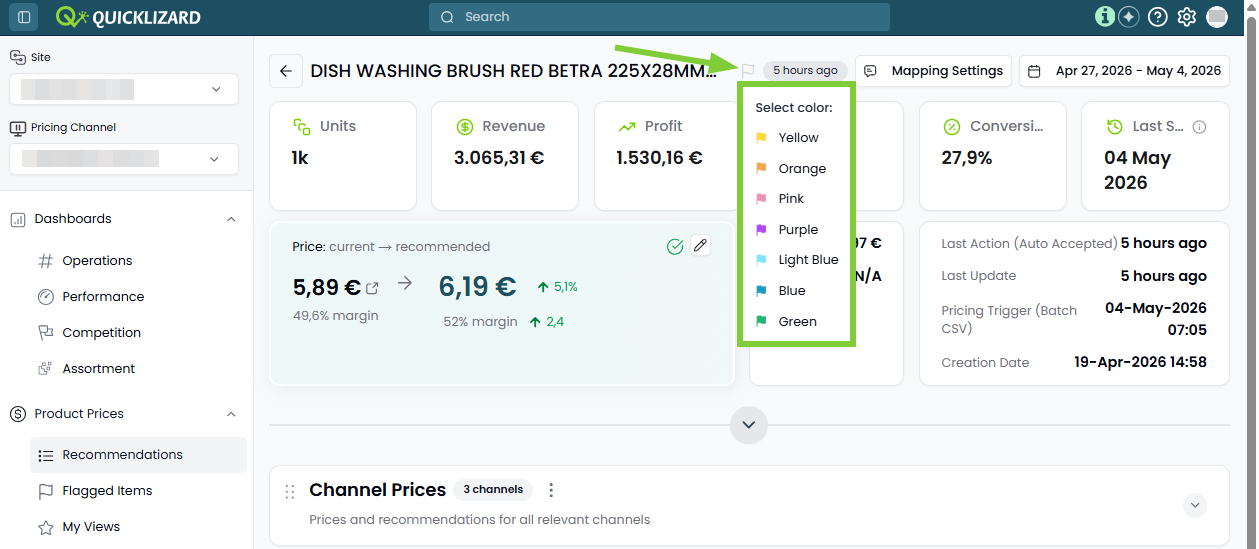
🔹Persistent Flagging. Quickly flag or unflag any individual SKU directly from the Price Recommendation Page or the Product Description Page. The pricing process does not reset the set flag.
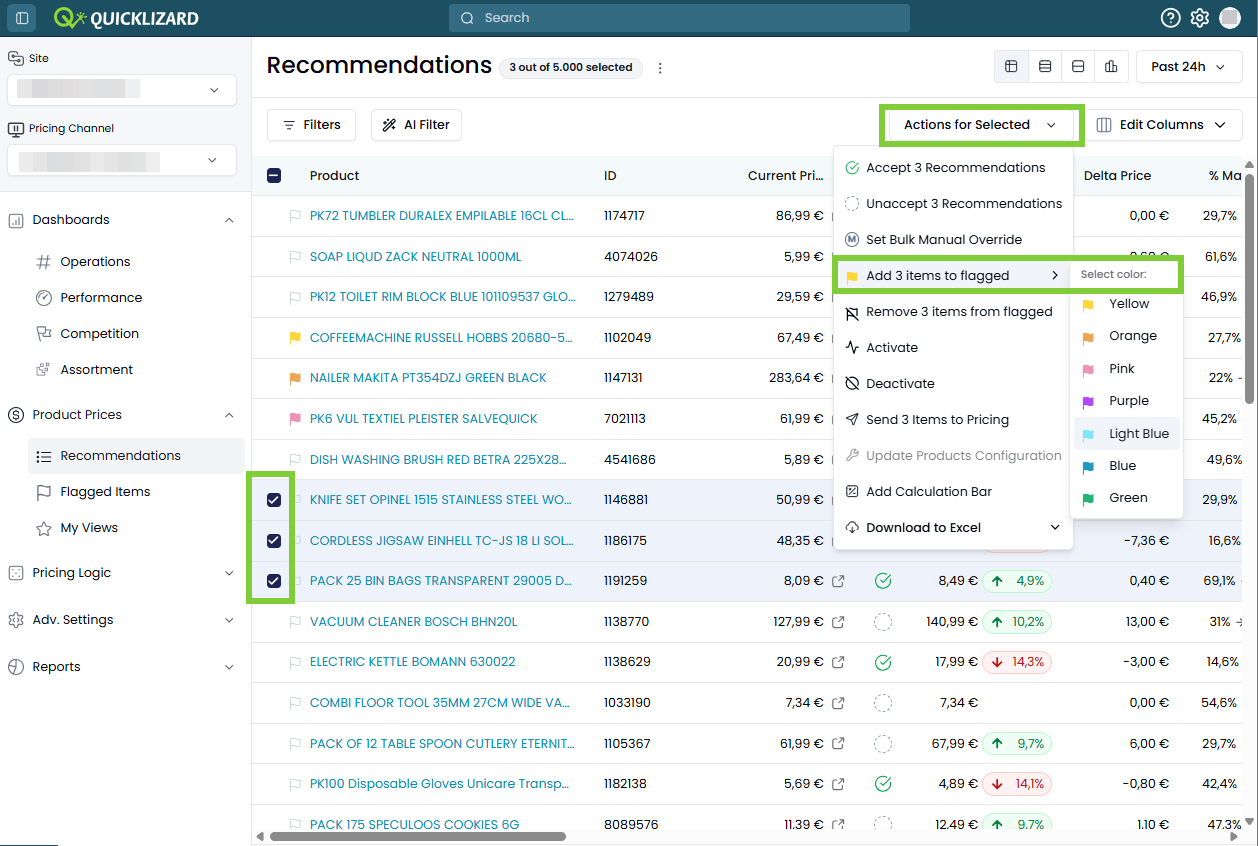
🔹Apply Flags in Bulk. Select multiple SKU's on the Price Recommendation Page, and set their flag via the Actions menu.
🔹Strategic Color-Coding. Right-click on the flag icon to a assign different color flag.
🔹Advanced Filtering & Access. Find your flagged SKUs via the Flagged Items submenu, or by adding a filter on 'Flagged items'.
🔹User-Level Organization. Flags are set on user-level and not on account level.
What this means for you:
🔹Persistent Flagging. Quickly flag or unflag any individual SKU directly from the Price Recommendation Page or the Product Description Page. The pricing process does not reset the set flag.
🔹Apply Flags in Bulk. Select multiple SKU's on the Price Recommendation Page, and set their flag via the Actions menu.
🔹Strategic Color-Coding. Right-click on the flag icon to a assign different color flag.
🔹Advanced Filtering & Access. Find your flagged SKUs via the Flagged Items submenu, or by adding a filter on 'Flagged items'.
🔹User-Level Organization. Flags are set on user-level and not on account level.
Improvement
Enhanced Bulk Product Configuration
You can now
selectively (re)set specific Product Configuration fields,
when updating the Product Configuration for
multiple SKUs in bulk.
What this means for you:
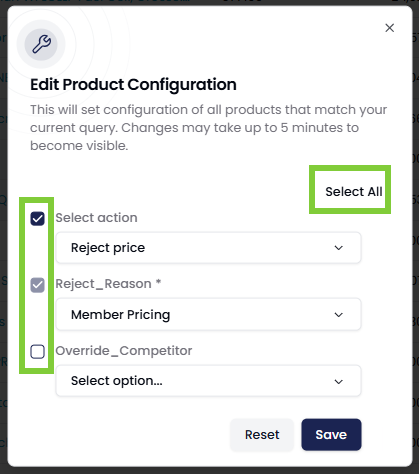
🔹Selective Field Updates. Select the Product Configuration fields that you want to update, while leaving other fields untouched. Untouched fields can remain empty or keep any value that was set earlier.
🔹Reset Date Value. For both single and bulk updates, you can clear values from any non-required Product Configuration field, including the date field.
What this means for you:
🔹Selective Field Updates. Select the Product Configuration fields that you want to update, while leaving other fields untouched. Untouched fields can remain empty or keep any value that was set earlier.
🔹Reset Date Value. For both single and bulk updates, you can clear values from any non-required Product Configuration field, including the date field.
April 2026
April 27, 2026
New UIImprovement
Enhanced Audit Log
The enhanced Audit Log provides a transparent, granular history
of every action taken across your site; showing
who did what, when, and how.
What this means for you:
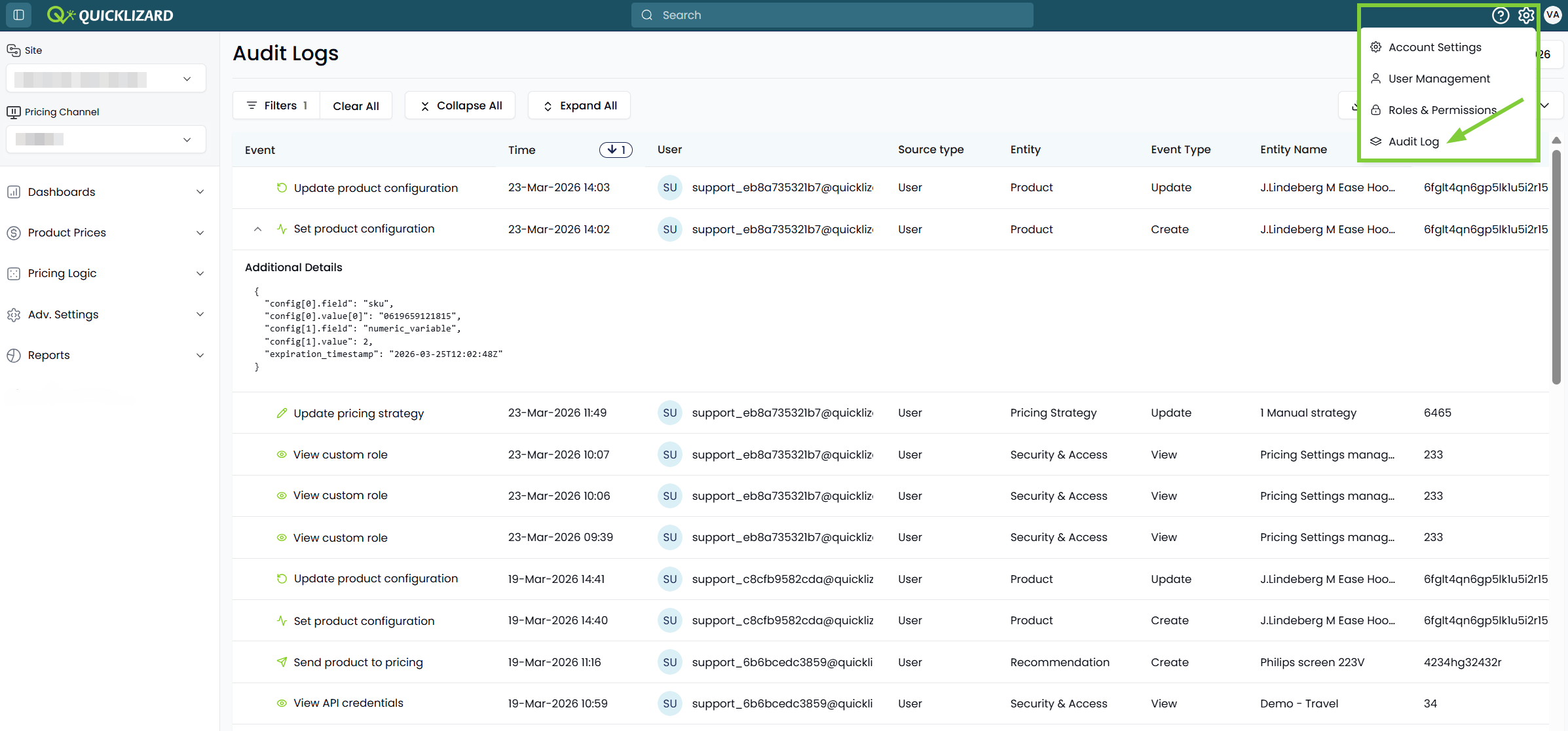
🔹Site-Wide Granular Change Tracking. The Audit Log shows data at the site level, consolidated across all channels. All user events are logged, including comprehensive event details.
🔹Modern Interface. Audit Logs are shown in a clear, extendable table enabling users to filter, sort and drag-and-drop columns. Main details are shown in the table, and additional details are accessed by expanding the rows.
🔹New REST API endpoint. Audit Log records can be exported via API, using the new API endpoint.
🔹Increased Retention Period. The UI supports a three-month searchable history, and an export of up to 13 months of data can be requested via the QL Support team.
🔹Enhanced Access Control. To protect sensitive operational data, access to the Audit Log is restricted to users with Account Settings permissions.
What this means for you:
🔹Site-Wide Granular Change Tracking. The Audit Log shows data at the site level, consolidated across all channels. All user events are logged, including comprehensive event details.
🔹Modern Interface. Audit Logs are shown in a clear, extendable table enabling users to filter, sort and drag-and-drop columns. Main details are shown in the table, and additional details are accessed by expanding the rows.
🔹New REST API endpoint. Audit Log records can be exported via API, using the new API endpoint.
🔹Increased Retention Period. The UI supports a three-month searchable history, and an export of up to 13 months of data can be requested via the QL Support team.
🔹Enhanced Access Control. To protect sensitive operational data, access to the Audit Log is restricted to users with Account Settings permissions.
New UIImprovement
Enhanced Global Custom Functions
Quickly view and access your Global Custom Functions,
using the reimagined page.
What this means for you:
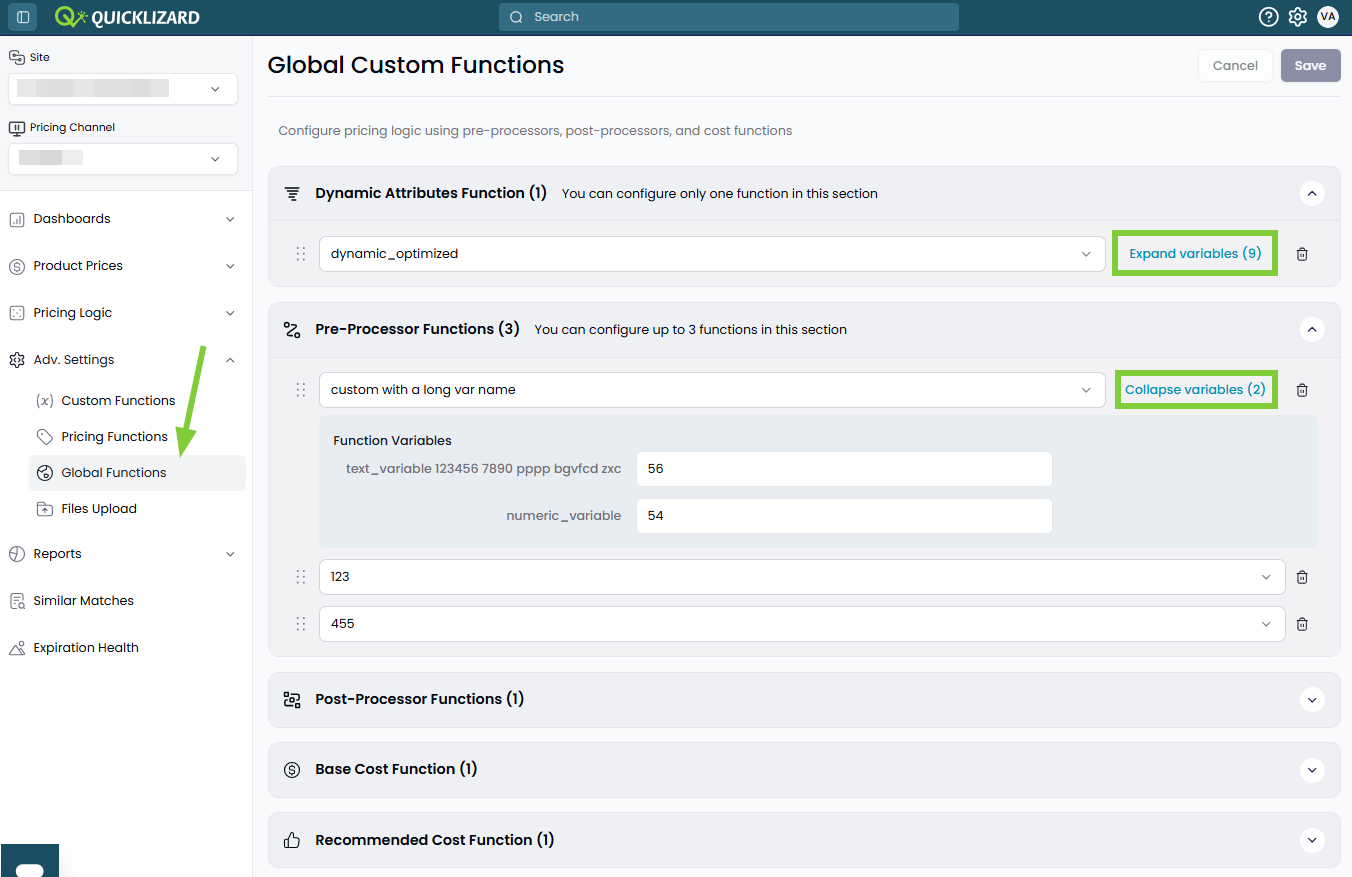
🔹Streamlined Logic Management. View all deployed functions in a clear layout, reorder the execution sequence with a simple drag-and-drop and collapse functions per type.
🔹Variables Available in All Function Types. The pricing engine now supports the usage of variables in Cost Functions.
🔹Dynamic Variable Visualization. Variables associated with global functions are presented in clean, collapsible lists, reducing any visual clutter.
🔹Persistent User Preferences. To improve your workflow and eliminate redundant clicks, the system remembers your workspace state.
🔹Streamlined Logic Management. View all deployed functions in a clear layout, reorder the execution sequence with a simple drag-and-drop and collapse functions per type.
🔹Variables Available in All Function Types. The pricing engine now supports the usage of variables in Cost Functions.
🔹Dynamic Variable Visualization. Variables associated with global functions are presented in clean, collapsible lists, reducing any visual clutter.
🔹Persistent User Preferences. To improve your workflow and eliminate redundant clicks, the system remembers your workspace state.
New UINew
Channel Prices Widget
Clients with multiple channels, where the
same SKU's are part of the different channels,
can now see the pricing data of all channels in the Channel Prices
widget on the Product Description Page.
What this means for you:
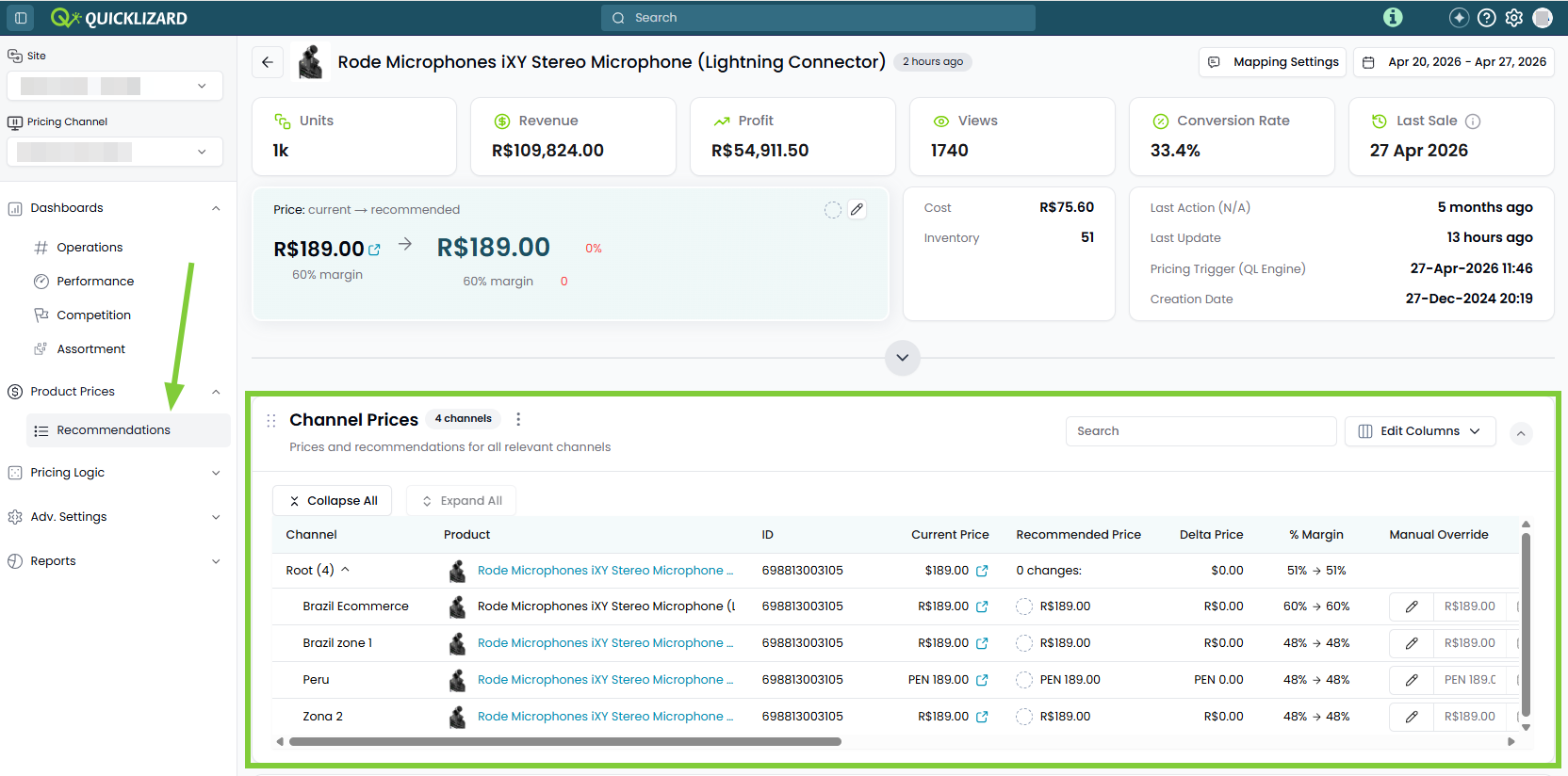
🔹Integrated Multi-Channel Visibility. Any user managing more than one channel will see the Channel Prices widget, allowing for faster cross-market comparisons.
🔹Customization Capabilities. The widget supports full column editing and drag-and-drop functionality.
🔹Permissions-Based Security. Data integrity is maintained through strict access controls; users will only see data for the specific channels they are authorized to view.
🔹Currency Transparency. Each individual row in the widget accurately displays the native currency of its respective channel. The summary row displays the primary channel's currency without conversion.
What this means for you:
🔹Integrated Multi-Channel Visibility. Any user managing more than one channel will see the Channel Prices widget, allowing for faster cross-market comparisons.
🔹Customization Capabilities. The widget supports full column editing and drag-and-drop functionality.
🔹Permissions-Based Security. Data integrity is maintained through strict access controls; users will only see data for the specific channels they are authorized to view.
🔹Currency Transparency. Each individual row in the widget accurately displays the native currency of its respective channel. The summary row displays the primary channel's currency without conversion.
New UINew
New Competitor REST API endpoint
It is now possible to export competitor price data via a new
REST API endpoint.
See all details in our REST API documentation
See all details in our REST API documentation
April 21, 2026
New UINew
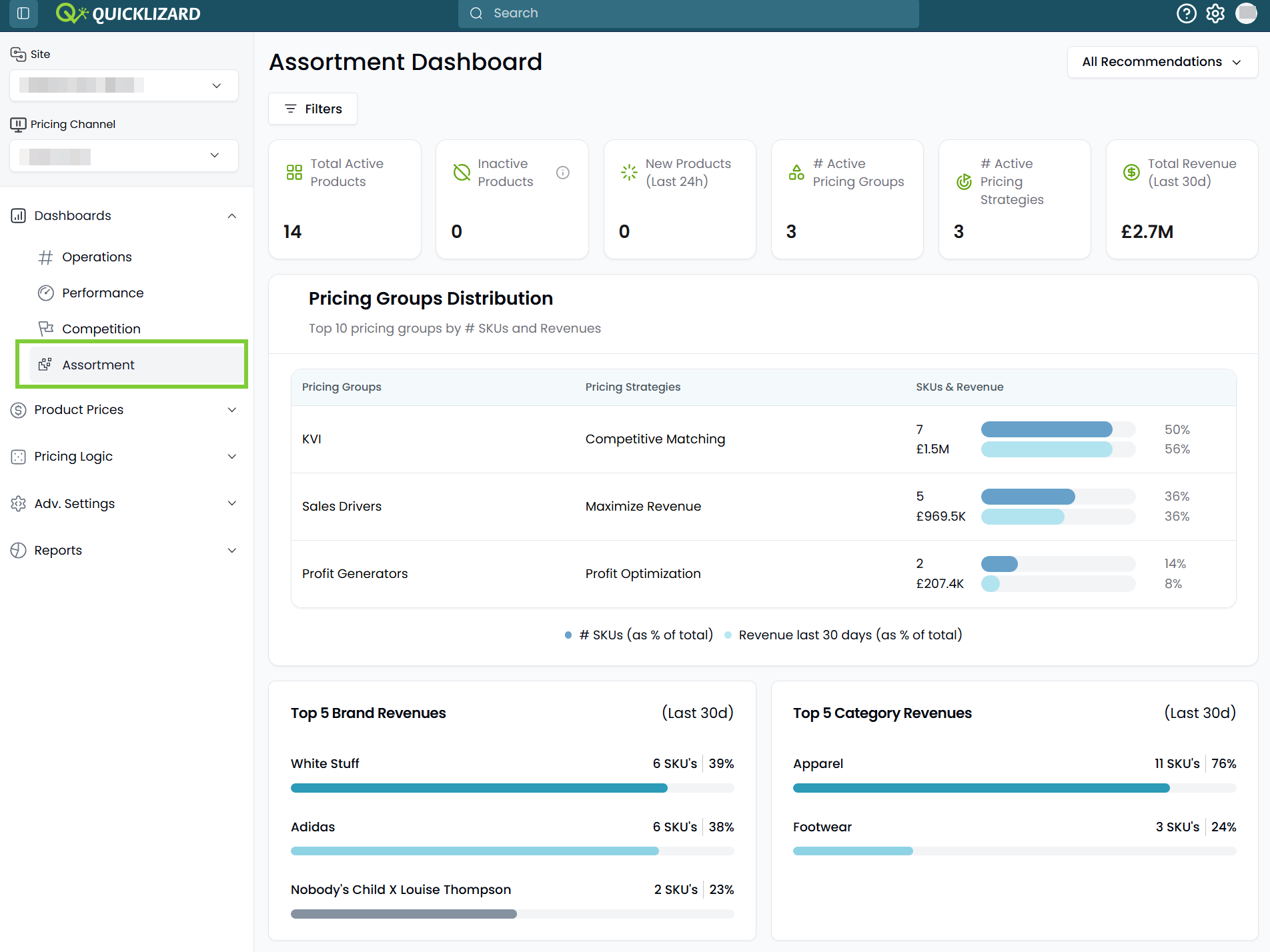
New Assortment Dashboard
Gain insights into your assortment, by using
the new Assortment Dashboard.
What this means for you:
🔹Assortment Health at a Glance. Monitor your total catalogue composition with real-time tracking of active products, inactive products (excluded from pricing), and newly added products.
🔹Brand & Category Intelligence. Seeing the top five brands and categories by SKU count and revenue share over the last 30 days, helps understand which pricing efforts generate the most value.
🔹Transparent Group-Strategy Mapping. Clearly see which strategies were associated with a pricing group during the chosen time-period. If multiple strategies were used this is indicated, ensuring full visibility into your pricing logic.
🔹Seamless Drill-Down. Move from insight to action instantly by clicking any KPI or link in the dashboard.
What this means for you:
🔹Assortment Health at a Glance. Monitor your total catalogue composition with real-time tracking of active products, inactive products (excluded from pricing), and newly added products.
🔹Brand & Category Intelligence. Seeing the top five brands and categories by SKU count and revenue share over the last 30 days, helps understand which pricing efforts generate the most value.
🔹Transparent Group-Strategy Mapping. Clearly see which strategies were associated with a pricing group during the chosen time-period. If multiple strategies were used this is indicated, ensuring full visibility into your pricing logic.
🔹Seamless Drill-Down. Move from insight to action instantly by clicking any KPI or link in the dashboard.
New UINew
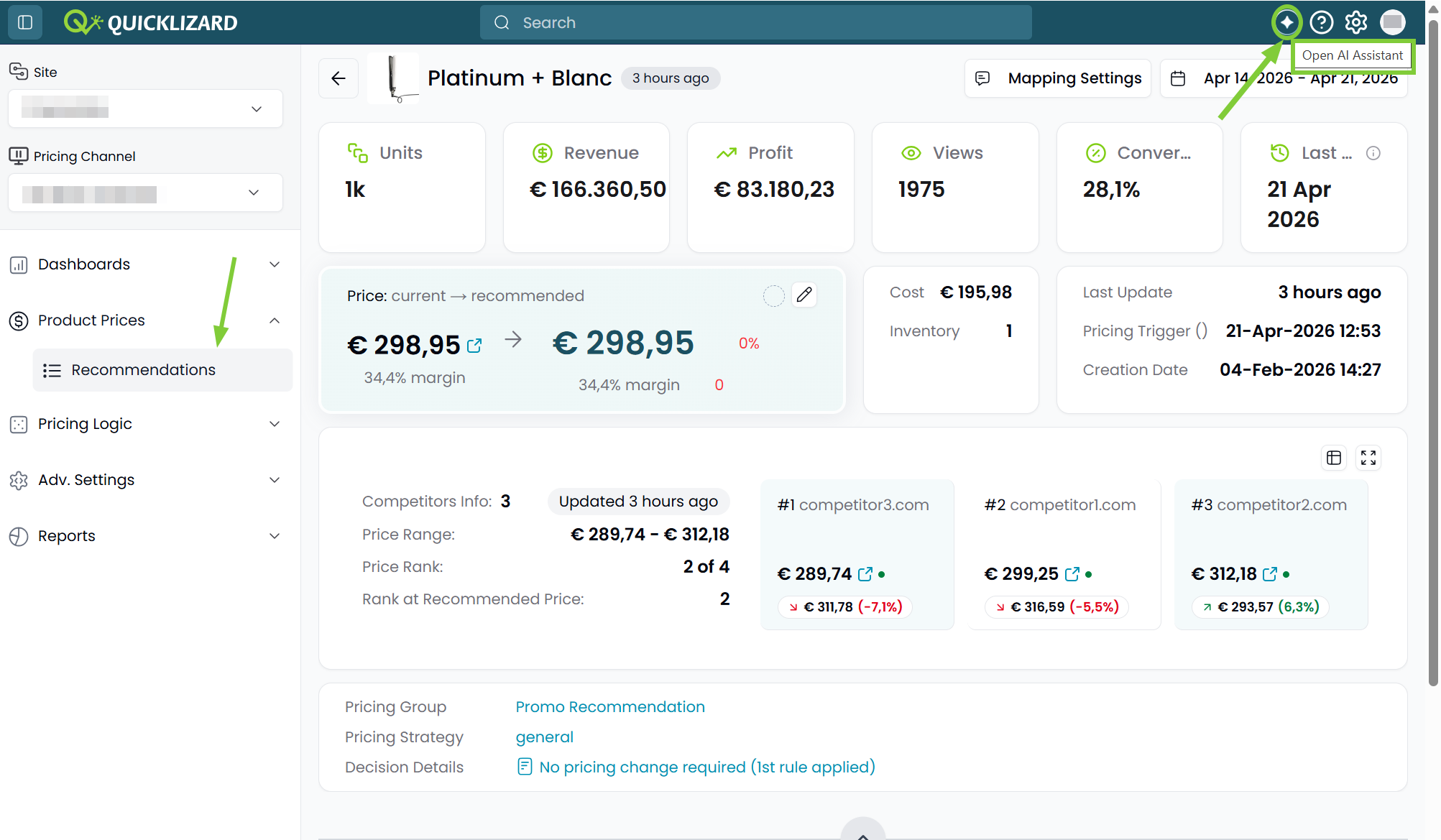
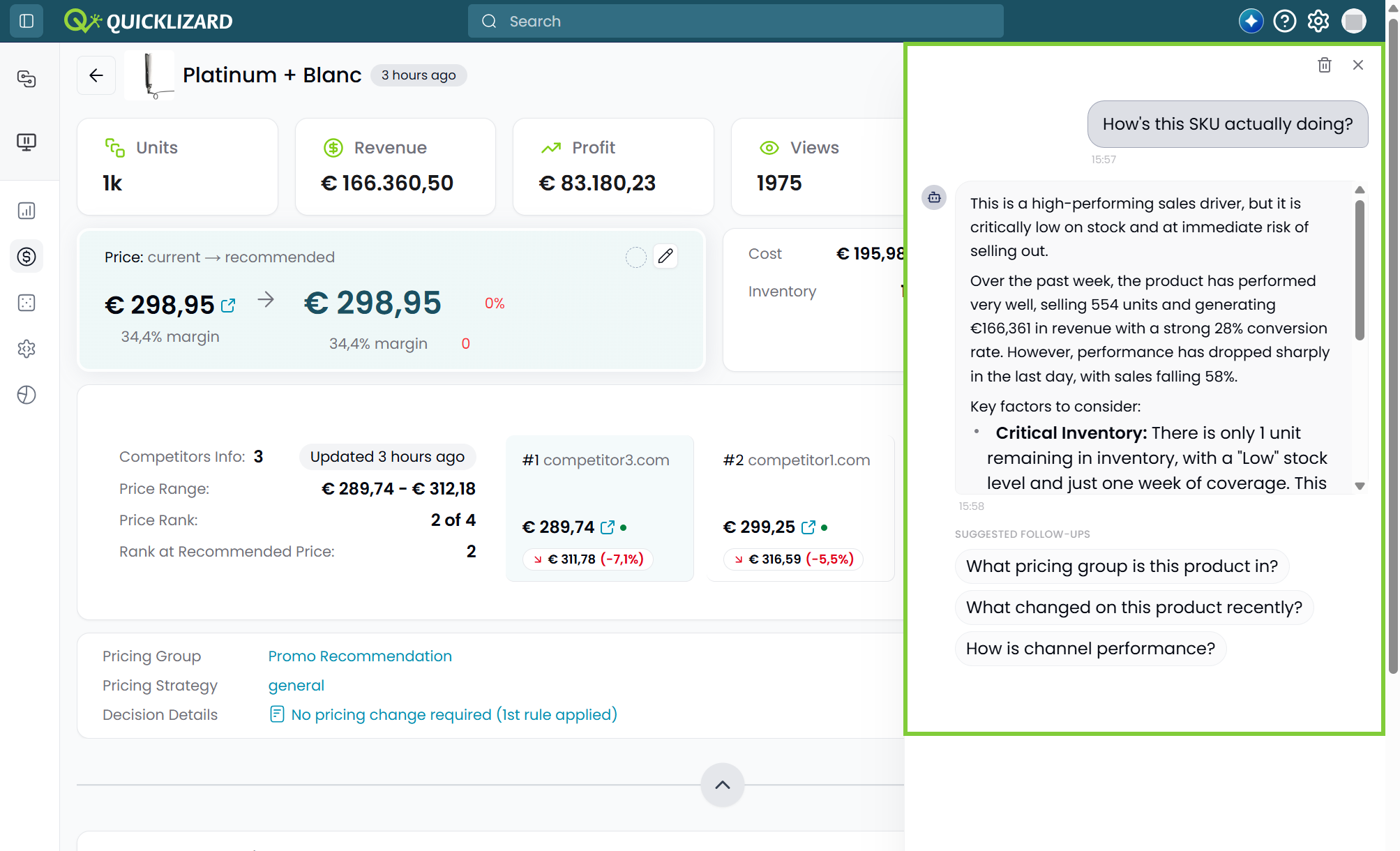
AI-Powered Product Assistant
Turn complex data into instant insights, and use the AI Assistant
to summarize trends and answer specific questions about your
SKUs.
What this means for you:
🔹Context-Aware Intelligence. The chatbot analyzes the specific attributes, widgets, and graphs visible on the Product Description Page. It provides answers grounded in your actual product data, making it a highly relevant tool for rapid SKU auditing.
🔹Unlimited Strategic Inquiry. There are currently no limits on the number of questions you can ask.
🔹Zero-Configuration Setup. The assistant is ready to use immediately and is not dependent on the activation of other AI models. It works with the data already provided on the PDP for your specific client key.
What this means for you:
🔹Context-Aware Intelligence. The chatbot analyzes the specific attributes, widgets, and graphs visible on the Product Description Page. It provides answers grounded in your actual product data, making it a highly relevant tool for rapid SKU auditing.
🔹Unlimited Strategic Inquiry. There are currently no limits on the number of questions you can ask.
🔹Zero-Configuration Setup. The assistant is ready to use immediately and is not dependent on the activation of other AI models. It works with the data already provided on the PDP for your specific client key.
March 2026
March 30, 2026
New UINew
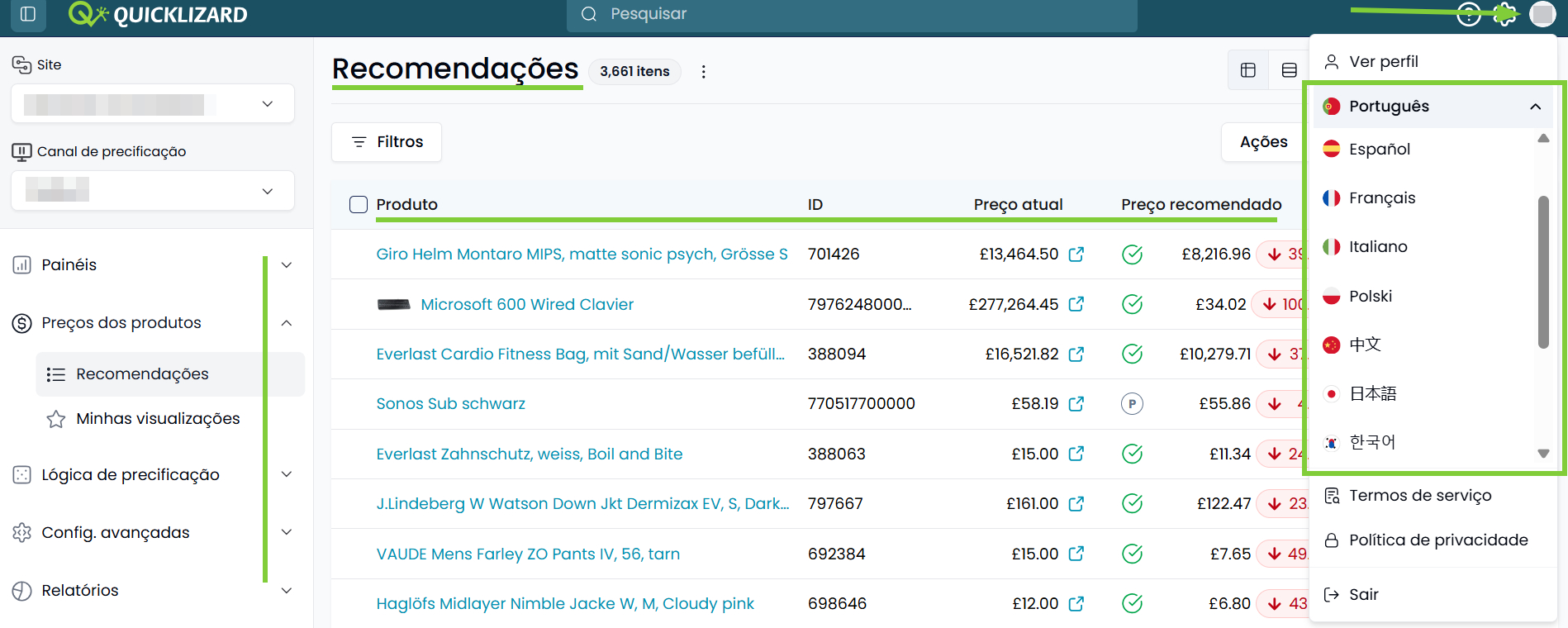
Expanded Global Language Support
We’ve made the Quicklizard platform more accessible and intuitive
for international users.
What this means for you:
🔹Broad International Coverage. The system now support a diverse array of 11 additional languages, including French, Italian, Spanish, Portuguese, Polish, Hungarian, Chinese, Japanese, Korean,Vietnamese and Thai.
🔹Increase Operational Effectiveness. Reduce onboarding time and minimizes operational errors by allowing local teams to navigate the Quicklizard application in their native language.
🔹Comprehensive UI Localization. Navigation menus and the vast majority of core pages support the additional languages. Dynamic client-side data, such as specific attribute labels and text within custom widgets, will remain in their original source language.
🔹Intelligent Translation Fallback. The system utilizes English as the universal fallback, to ensure a seamless user experience without broken layouts or empty fields.
What this means for you:
🔹Broad International Coverage. The system now support a diverse array of 11 additional languages, including French, Italian, Spanish, Portuguese, Polish, Hungarian, Chinese, Japanese, Korean,Vietnamese and Thai.
🔹Increase Operational Effectiveness. Reduce onboarding time and minimizes operational errors by allowing local teams to navigate the Quicklizard application in their native language.
🔹Comprehensive UI Localization. Navigation menus and the vast majority of core pages support the additional languages. Dynamic client-side data, such as specific attribute labels and text within custom widgets, will remain in their original source language.
🔹Intelligent Translation Fallback. The system utilizes English as the universal fallback, to ensure a seamless user experience without broken layouts or empty fields.
New UIImprovement
Enhanced Audit Log - available in Beta!
The enhanced Audit Log provides a transparent, granular history
of every action taken across your site; showing
who did what, when, and how.
What this means for you:
🔹Site-Wide Granular Change Tracking. The Audit Log shows data at the site level, consolidated across all channels. All user events are logged, including comprehensive event details.
🔹Modern Interface. Audit Logs are shown in a clear, extendable table enabling users to filter, sort and drag-and-drop columns. Main details are shown in the table, and additional details are accessed by expanding the rows.
🔹Increased Retention Period. The UI supports a three-month searchable history, and an export of up to 13 months of data can be requested via the QL Support team.
🔹Enhanced Access Control. To protect sensitive operational data, access to the Audit Log is restricted to users with Account Settings permissions.
What this means for you:
🔹Site-Wide Granular Change Tracking. The Audit Log shows data at the site level, consolidated across all channels. All user events are logged, including comprehensive event details.
🔹Modern Interface. Audit Logs are shown in a clear, extendable table enabling users to filter, sort and drag-and-drop columns. Main details are shown in the table, and additional details are accessed by expanding the rows.
🔹Increased Retention Period. The UI supports a three-month searchable history, and an export of up to 13 months of data can be requested via the QL Support team.
🔹Enhanced Access Control. To protect sensitive operational data, access to the Audit Log is restricted to users with Account Settings permissions.
New UIImprovement
Competitor Price History
Spot competitor trends without switching views,
by using the Competitor modal directly in the Pricing Recommendations
table view.
What this means for you:
🔹Improve Efficiency. Save time by accessing the previous competitor price and trend from the table view directly, without having to access the Product Description Page.
🔹Streamlined Comparison. Simplify the process of identifying which competitors are aggressive movers and which have remained stable during the latest pricing cycle.
🔹Unified Context. Maintain your focus on the current recommendation while having the necessary background data to validate it.
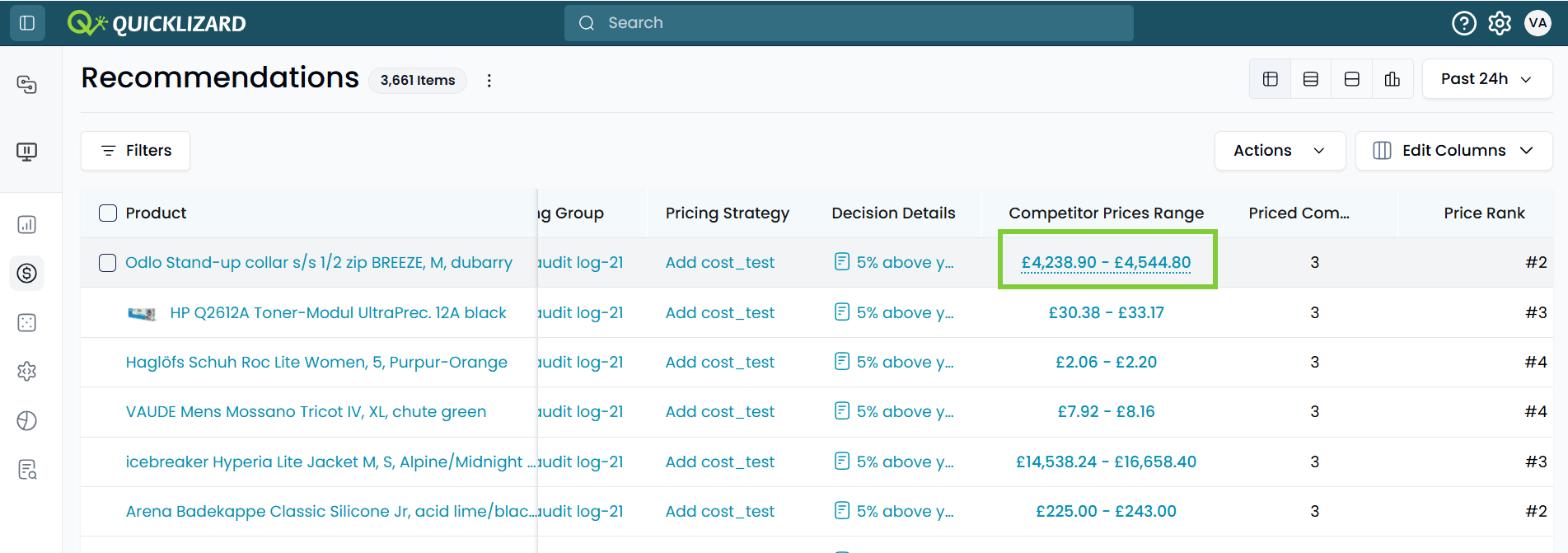
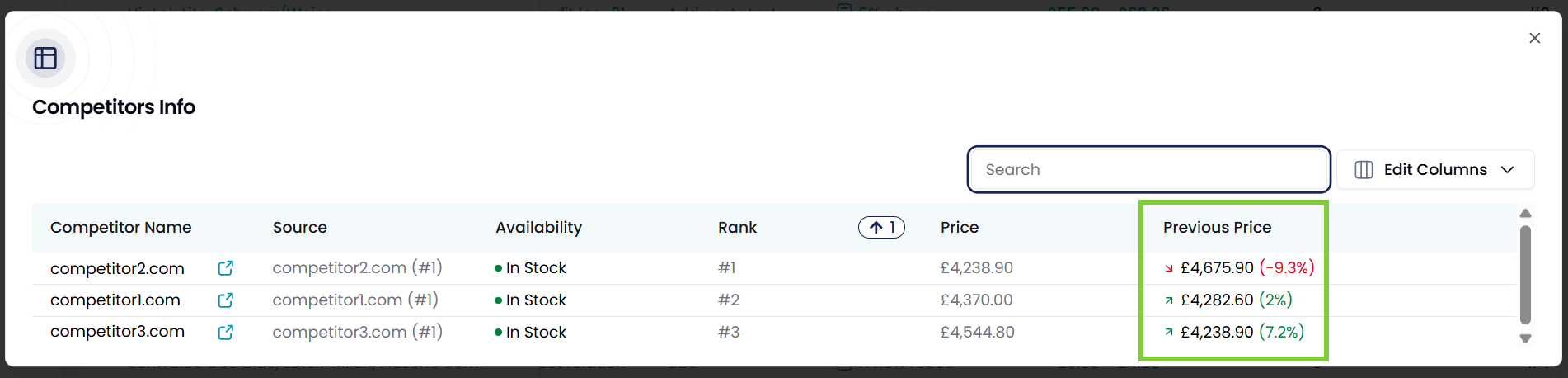
What this means for you:
🔹Improve Efficiency. Save time by accessing the previous competitor price and trend from the table view directly, without having to access the Product Description Page.
🔹Streamlined Comparison. Simplify the process of identifying which competitors are aggressive movers and which have remained stable during the latest pricing cycle.
🔹Unified Context. Maintain your focus on the current recommendation while having the necessary background data to validate it.
March 12, 2026
Improvement
Expanded (Range) Keys in Parameter Sheet
Handle more complex Parameter Sheet
structures with ease.
What this means for you:
🔹Increased Range Keys Allowed. The combined limit for (Date) Range Keys has been increased to 10, allowing for significantly more detailed "from-to" mapping.
🔹Total Key Capacity Expanded. We have increased the total number of keys supported to 20 per Parameter Sheet, supporting a comination of up to 10 (Date) Range Keys and 10 standard Keys.
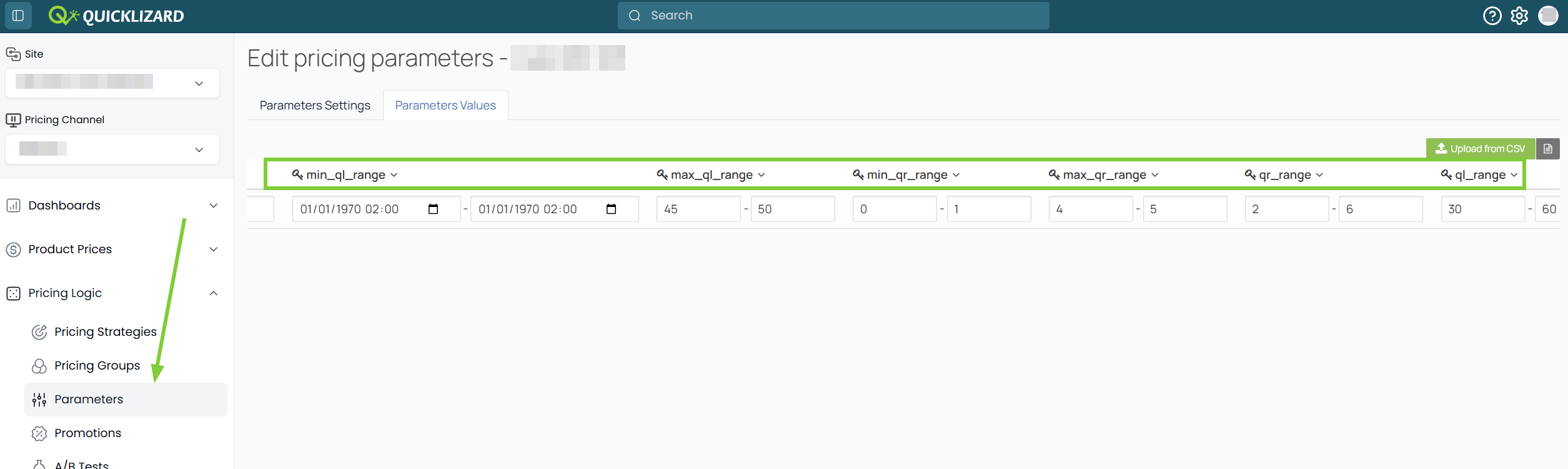
What this means for you:
🔹Increased Range Keys Allowed. The combined limit for (Date) Range Keys has been increased to 10, allowing for significantly more detailed "from-to" mapping.
🔹Total Key Capacity Expanded. We have increased the total number of keys supported to 20 per Parameter Sheet, supporting a comination of up to 10 (Date) Range Keys and 10 standard Keys.
March 9, 2026
New UIImprovement
Optimized Pricing Strategies Index Page
Quickly view and access your Pricing Strategies,
using the updated Index page.
What this means for you:
🔹Consistent & Modern UI. The Pricing Strategies Index page now supports drag-and-drop columns and sorting on columns.
🔹Enhanced Data Visibility. Pricing Functions can be added as a column, for quick reference of the underlying logic, and a badge at the top of the page shows the total number of strategies.
🔹Integrated Strategy Traceability. When checking where a specific strategy is used, the system automatically redirects you to a pre-filtered view of the Pricing Groups Index page.
🔹Significant Performance Boost. We’ve optimized the backend performance of the Pricing Strategies Index page to ensure significantly faster load times.
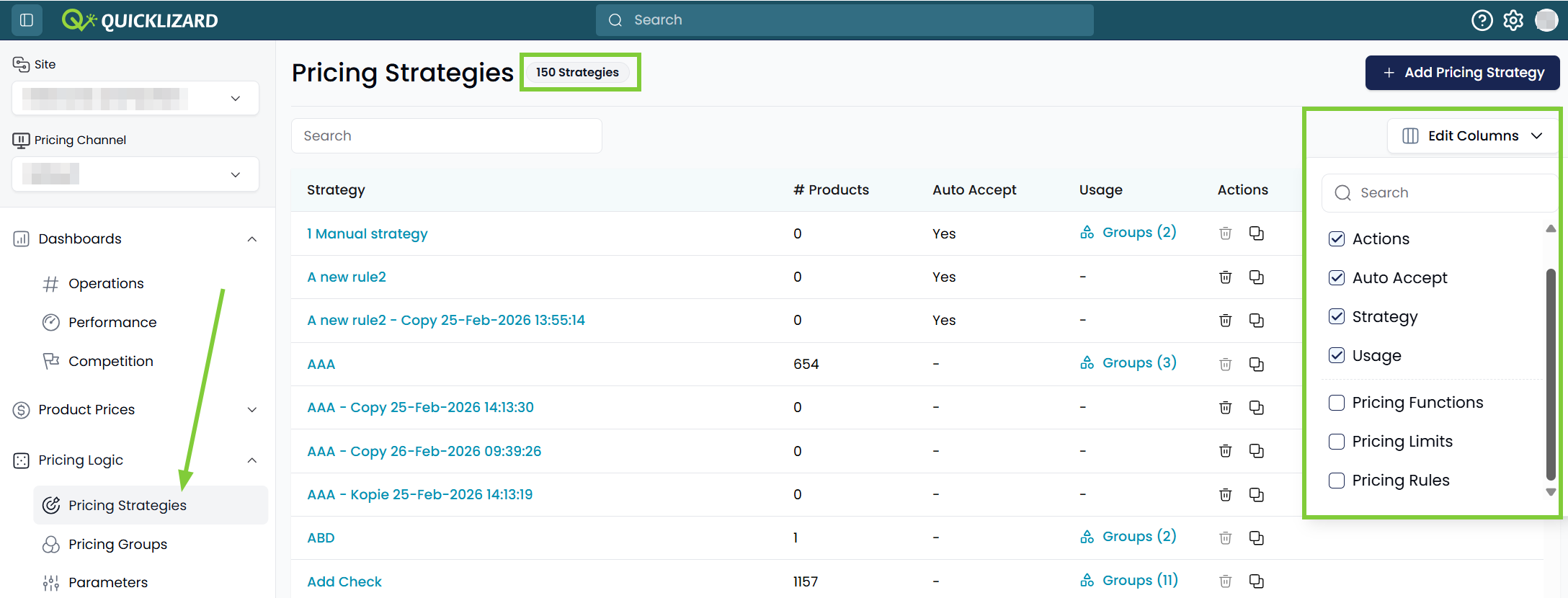
What this means for you:
🔹Consistent & Modern UI. The Pricing Strategies Index page now supports drag-and-drop columns and sorting on columns.
🔹Enhanced Data Visibility. Pricing Functions can be added as a column, for quick reference of the underlying logic, and a badge at the top of the page shows the total number of strategies.
🔹Integrated Strategy Traceability. When checking where a specific strategy is used, the system automatically redirects you to a pre-filtered view of the Pricing Groups Index page.
🔹Significant Performance Boost. We’ve optimized the backend performance of the Pricing Strategies Index page to ensure significantly faster load times.
New UINew
Unified Pricing Strategy Experience
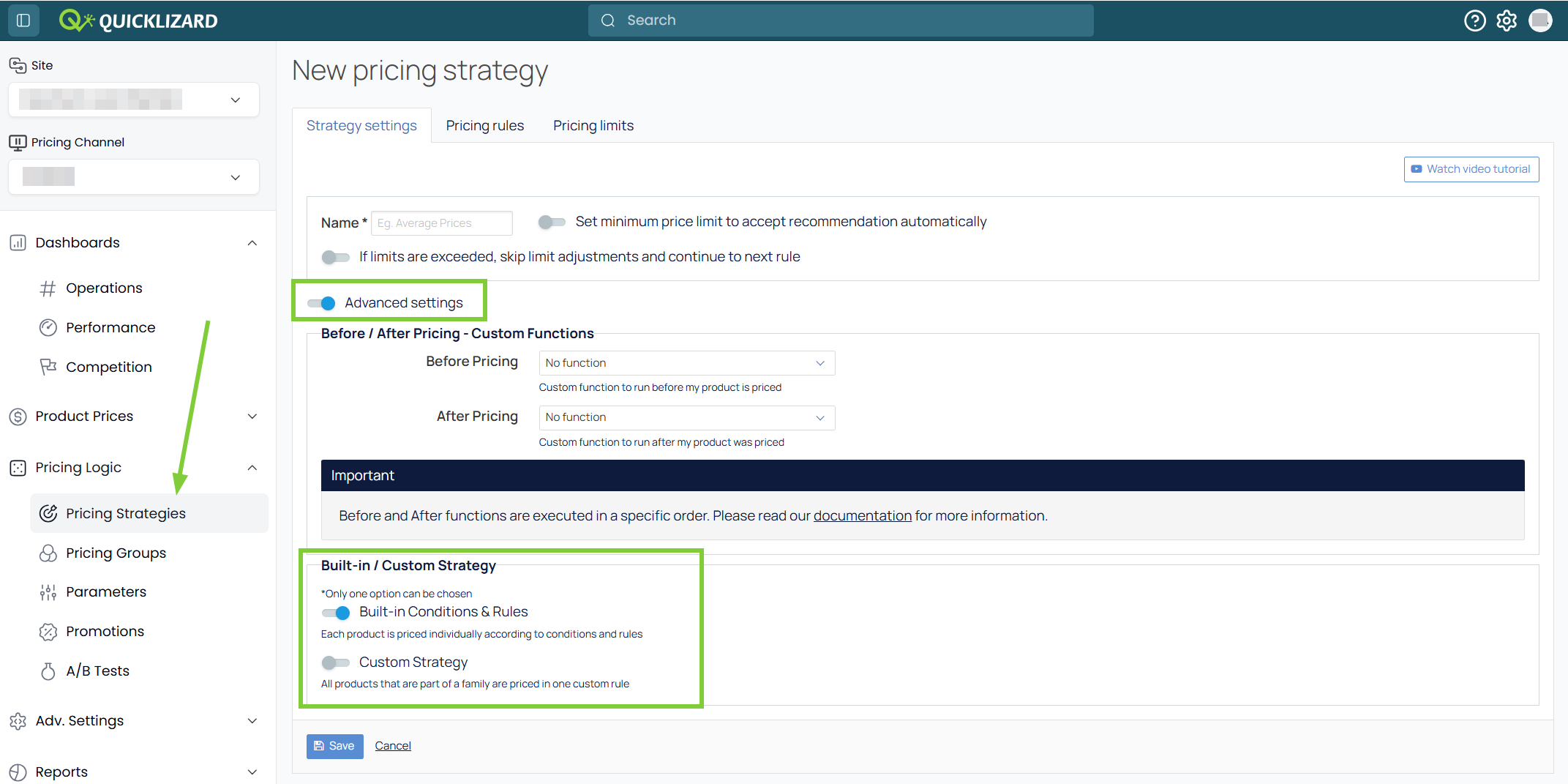
Strategies are no longer split into "Single" and "Bulk", but
are now unified into one type.
What this means for you:
🔹Maximum flexibility with zero complexity. Simplified strategy setup, allowing you to scale up your strategy logic without switching strategy types.
🔹On-the-Fly Logic Toggling. Simply switch your strategy logic, by changing a toggle in the Pricing Strategy settings.
🔹De-Cluttered Interface. Redundant icons and filters were removed from the Pricing Strategy Index page, leaving a clean and focused view.
🔹Seamless Continuity. Existing strategies continue to work, transition was performed with zero downtime.
What this means for you:
🔹Maximum flexibility with zero complexity. Simplified strategy setup, allowing you to scale up your strategy logic without switching strategy types.
🔹On-the-Fly Logic Toggling. Simply switch your strategy logic, by changing a toggle in the Pricing Strategy settings.
🔹De-Cluttered Interface. Redundant icons and filters were removed from the Pricing Strategy Index page, leaving a clean and focused view.
🔹Seamless Continuity. Existing strategies continue to work, transition was performed with zero downtime.
New UIImprovement
Optimized Pricing Groups Index Page
Use the updated Index page to quickly
navigate and access your Pricing Groups.
What this means for you:
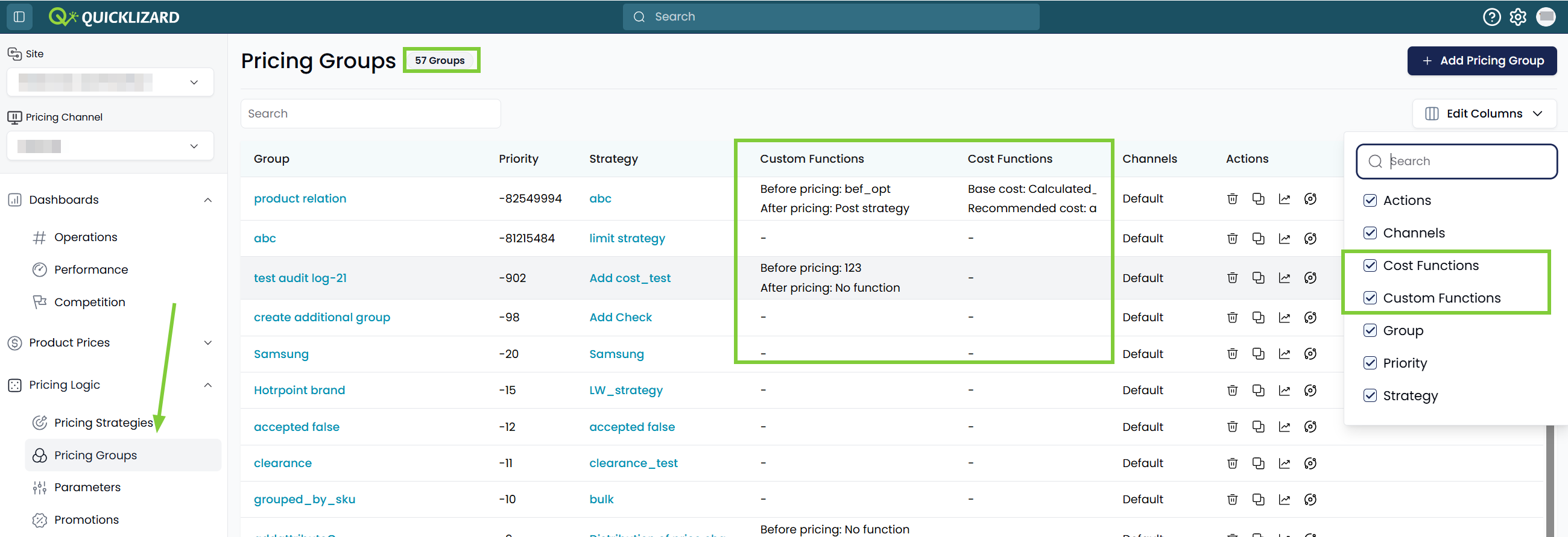
🔹Unified UI. The Pricing Groups Index page now supports drag-and-drop columns and sorting on columns.
🔹Expanded Data Visibility. Pricing and Cost Functions can be added as columns, for better understanding of the group logic, and a badge at the top of the page shows the total number of groups.
🔹Instant Page Performance. We’ve optimized the backend performance of the Pricing Groups Index page to ensure significantly faster load times.
What this means for you:
🔹Unified UI. The Pricing Groups Index page now supports drag-and-drop columns and sorting on columns.
🔹Expanded Data Visibility. Pricing and Cost Functions can be added as columns, for better understanding of the group logic, and a badge at the top of the page shows the total number of groups.
🔹Instant Page Performance. We’ve optimized the backend performance of the Pricing Groups Index page to ensure significantly faster load times.
February 2026
February 23, 2026
New UIImprovement
Enhanced Advanced Filters
Navigate your product catalogue using our
improved filtering engine, and
quickly find the products you're looking for.
What this means for you:
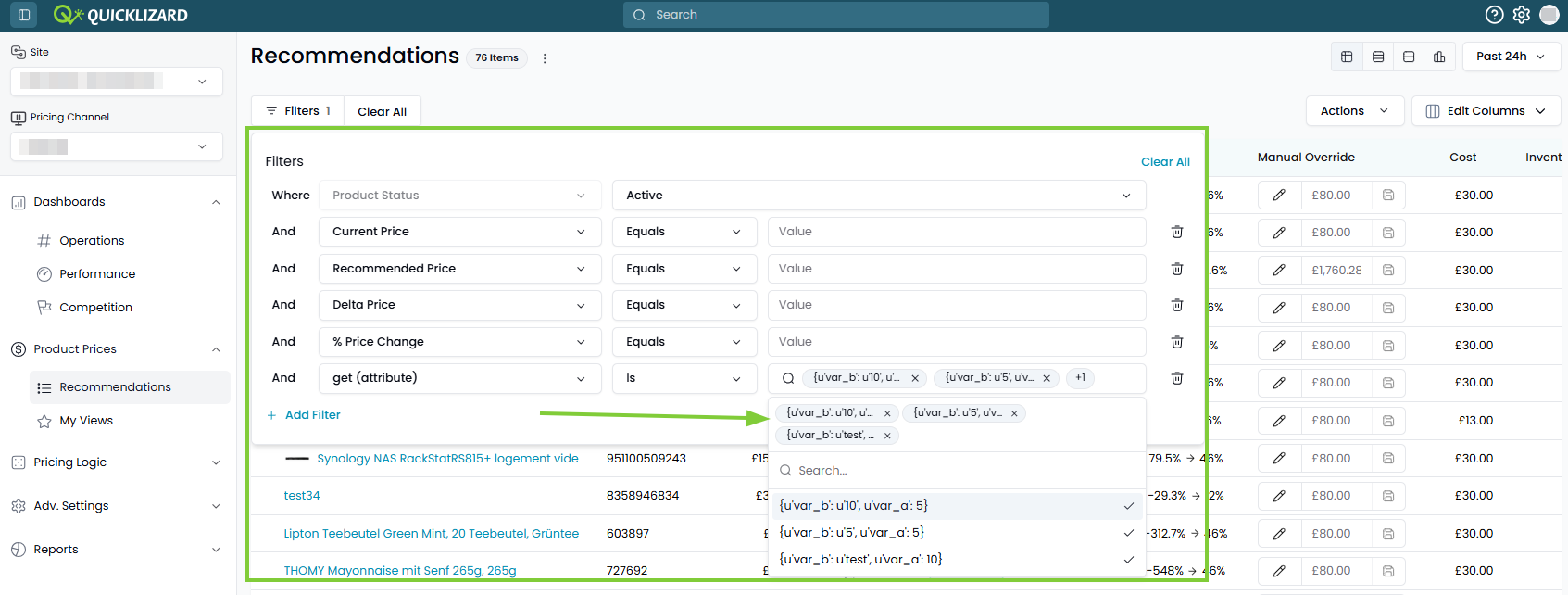
🔹Consistent, Spacious & Uniform UI. We’ve expanded the filter menu and field widths to accommodate longer attribute names and values, and made the filter interface more uniformn.
🔹Added Filter Options. Filter on 'Current Price', 'Recommended Price', 'Delta Price' or '% Price Change'.
🔹Smart Multi-Select Management. When using multi-select filters, all active choices are pinned as highly visible badges at the top of the dropdown.
What this means for you:
🔹Consistent, Spacious & Uniform UI. We’ve expanded the filter menu and field widths to accommodate longer attribute names and values, and made the filter interface more uniformn.
🔹Added Filter Options. Filter on 'Current Price', 'Recommended Price', 'Delta Price' or '% Price Change'.
🔹Smart Multi-Select Management. When using multi-select filters, all active choices are pinned as highly visible badges at the top of the dropdown.
New UIImprovement
Change Manual Override Settings in Bulk
We have further enhanced our Bulk Manual Override
capabilities.
What this means for you:
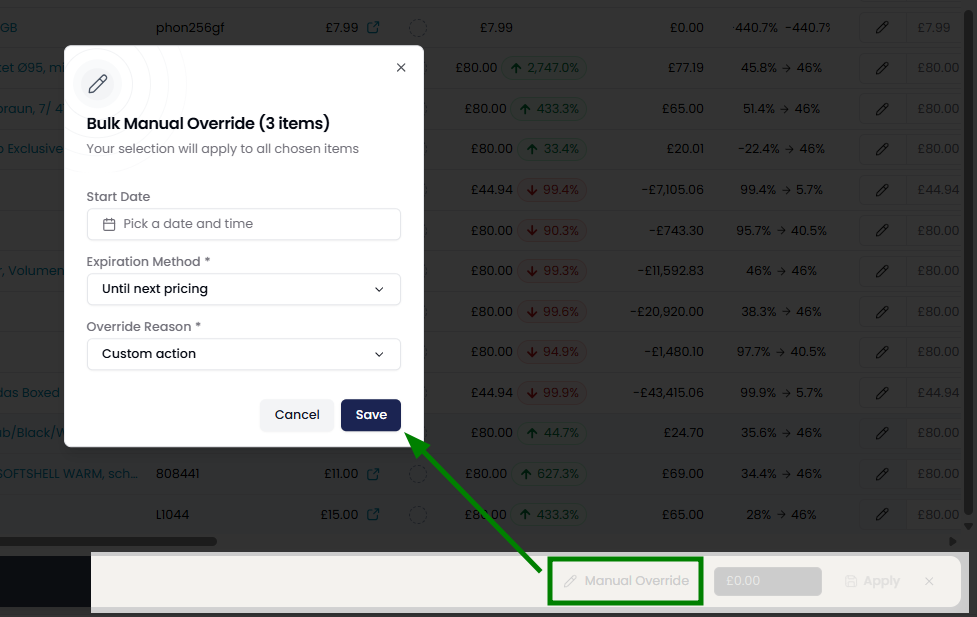
🔹Comprehensive Bulk Updates. You can now modify the accompanying override settings for multiple products simultaneously.
🔹Uniform Strategy Deployment. Apply identical override settings to an entire group of SKUs in a single action, reducing the risk of fragmented settings.
🔹Workflow Acceleration. Drastically reduce the time spent on overriding product prices.
Learn more ➝
What this means for you:
🔹Comprehensive Bulk Updates. You can now modify the accompanying override settings for multiple products simultaneously.
🔹Uniform Strategy Deployment. Apply identical override settings to an entire group of SKUs in a single action, reducing the risk of fragmented settings.
🔹Workflow Acceleration. Drastically reduce the time spent on overriding product prices.
Learn more ➝
New UIImprovement
Start Manual Override at Future Date
Execute your price changes ahead of time, by
scheduling manual overrides for a future date.
What this means for you:
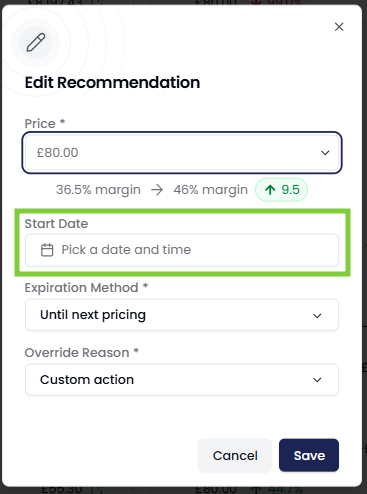
🔹Future-Dated Execution. When applying a manual override, you have the option to select a specific future date and time for the price to take effect. This bridges the gap between manual control and automated scheduling.
🔹Global Availability with Local Control. This feature is now enabled by default for all clients to maximize strategic capability. Administrators can easily toggle this feature off via the Account Settings.
Learn more ➝
What this means for you:
🔹Future-Dated Execution. When applying a manual override, you have the option to select a specific future date and time for the price to take effect. This bridges the gap between manual control and automated scheduling.
🔹Global Availability with Local Control. This feature is now enabled by default for all clients to maximize strategic capability. Administrators can easily toggle this feature off via the Account Settings.
Learn more ➝
Improvement
Enhanced Tracking of Promotion Changes via Recommendations API
Allow for full data synchronicity between Quicklizard
and any external systems.
What this means for you:
🔹Comprehensive Event Logging. Any modification to a promotion, such as validity dates or custom attribute fields, automatically generates a new event.
🔹Added Filtering Flags. 2 new flags are available in the Recommendations/Log API endpoint, being 'Only Promoted Items' and 'Exclude Promoted Items'.
What this means for you:
🔹Comprehensive Event Logging. Any modification to a promotion, such as validity dates or custom attribute fields, automatically generates a new event.
🔹Added Filtering Flags. 2 new flags are available in the Recommendations/Log API endpoint, being 'Only Promoted Items' and 'Exclude Promoted Items'.
February 9, 2026
New UINew
Bulk Manual Override
Accelerate your pricing operations without compromising
on data integrity.
What this means for you:
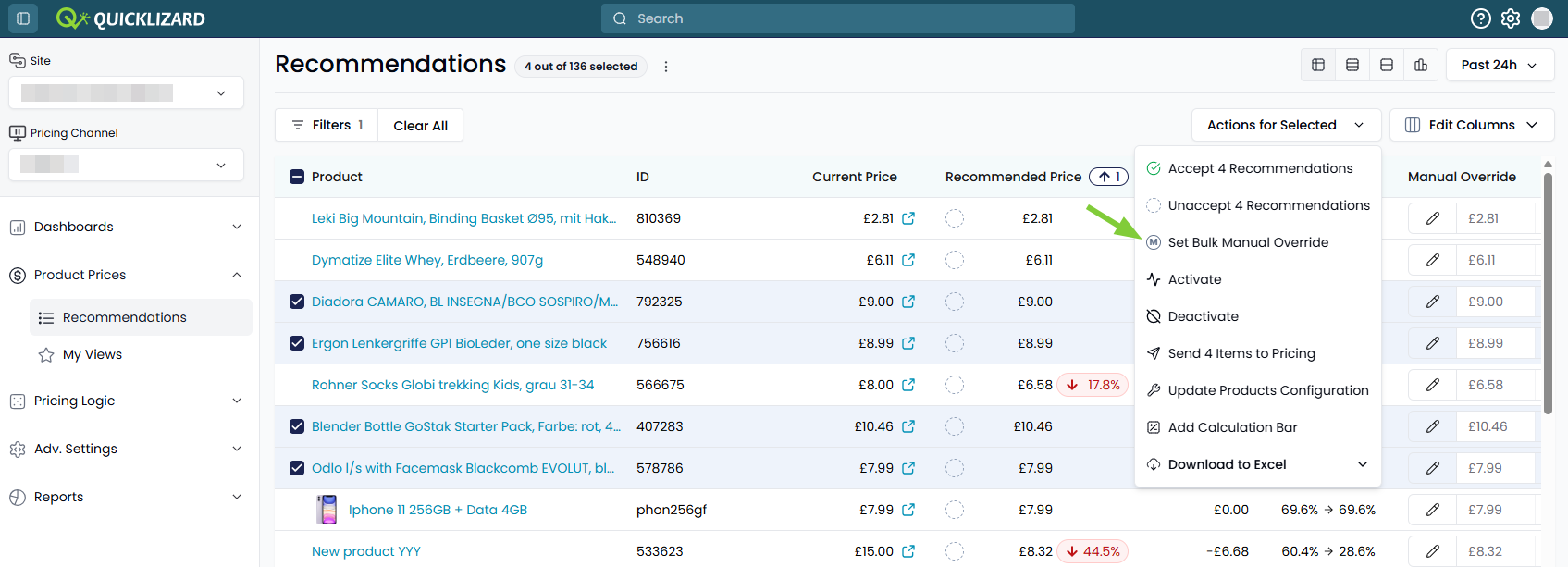
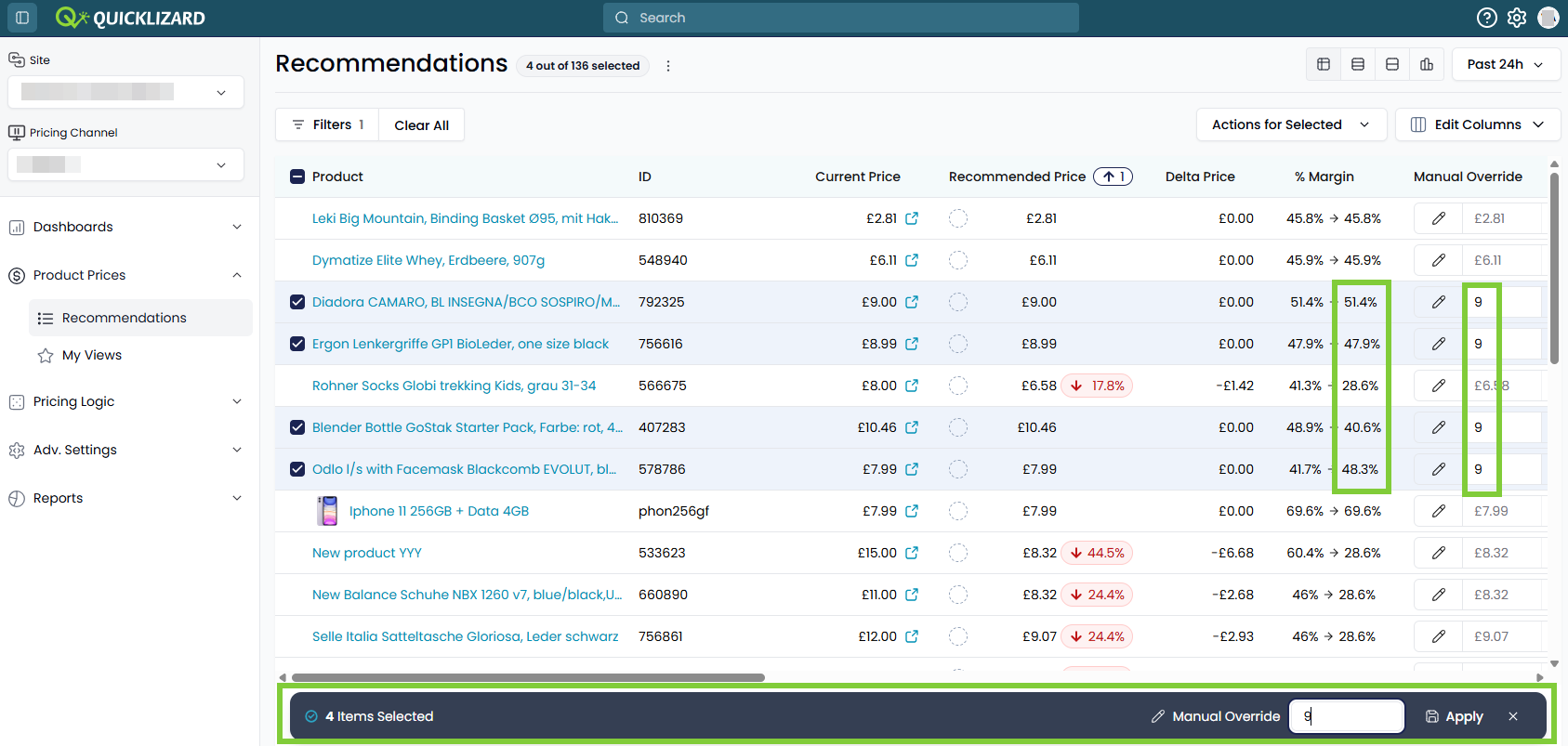
🔹Bulk Manual Override. Adjust prices across multiple selected products simultaneously.
🔹Real-time Simulation. Preview the margin impact of the proposed price change, before committing the change.
🔹Advanced Configuration. Maintain the ability to change override settings for individual products where needed.
Learn more ➝
What this means for you:
🔹Bulk Manual Override. Adjust prices across multiple selected products simultaneously.
🔹Real-time Simulation. Preview the margin impact of the proposed price change, before committing the change.
🔹Advanced Configuration. Maintain the ability to change override settings for individual products where needed.
Learn more ➝
New UINew
High-Impact Price Guardrail
Prevent costly manual errors before they go
live.
What this means for you:
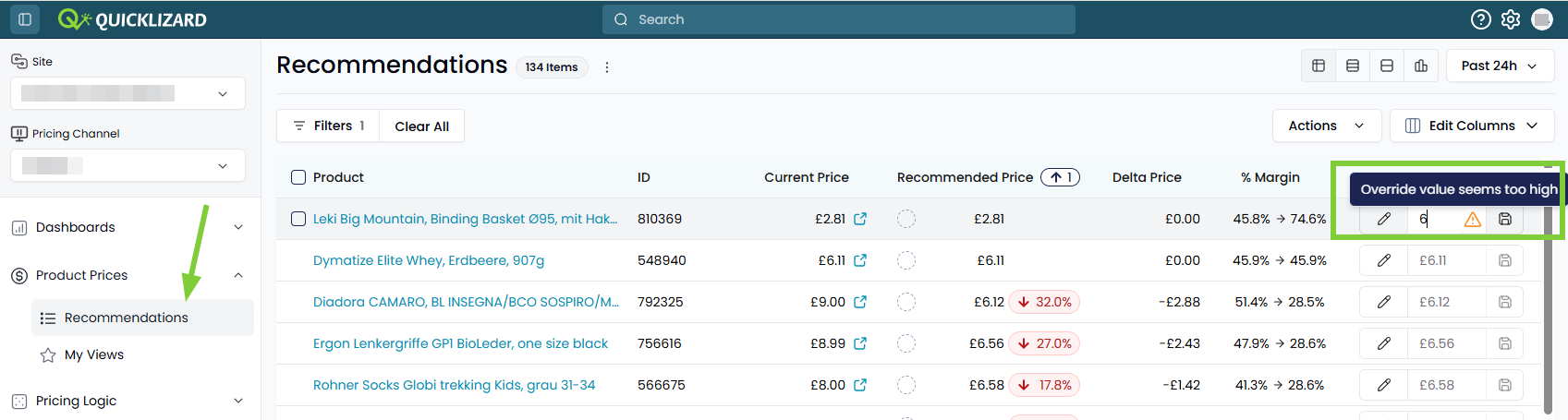
🔹Instant Volatility Alerts. See an alert, when a manual override more than doubles the original price, before the change is committed.
🔹Pro-active Correction. Catch an override mistake at the source and correct it, thereby eliminating the need for later "fixes".
🔹All-round Protection. Whether you are overriding a single product or are performing a bulk manual override, the alert will appear wherever the action is performed.
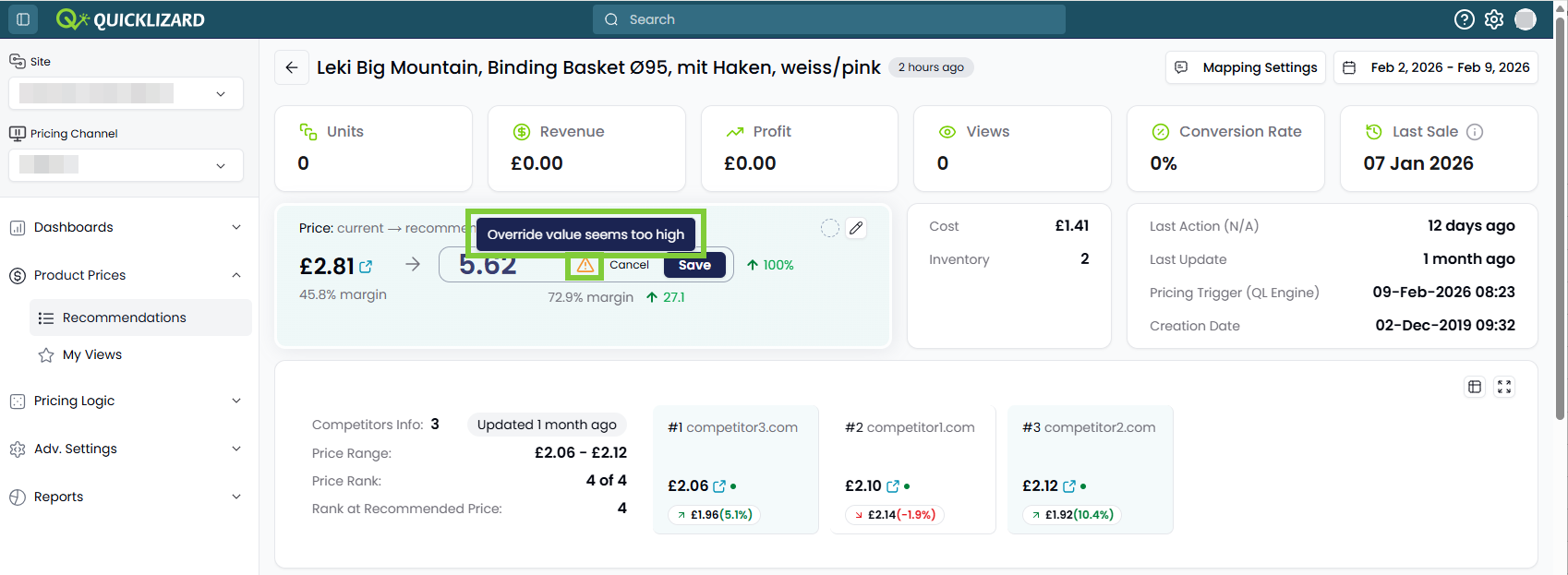
What this means for you:
🔹Instant Volatility Alerts. See an alert, when a manual override more than doubles the original price, before the change is committed.
🔹Pro-active Correction. Catch an override mistake at the source and correct it, thereby eliminating the need for later "fixes".
🔹All-round Protection. Whether you are overriding a single product or are performing a bulk manual override, the alert will appear wherever the action is performed.
New
Define priorities between promotions
Ensure that your
most important promotions take precedence, by
assigning a priority to your promotions.
What this means for you:
🔹Manage Overlapping Promotions. If a product is part of multiple overlapping promotions, the priority will define which promotion is applied.
🔹Default Precedence. When no priority is assigned, the promotion with the earliest start data will take precendence.
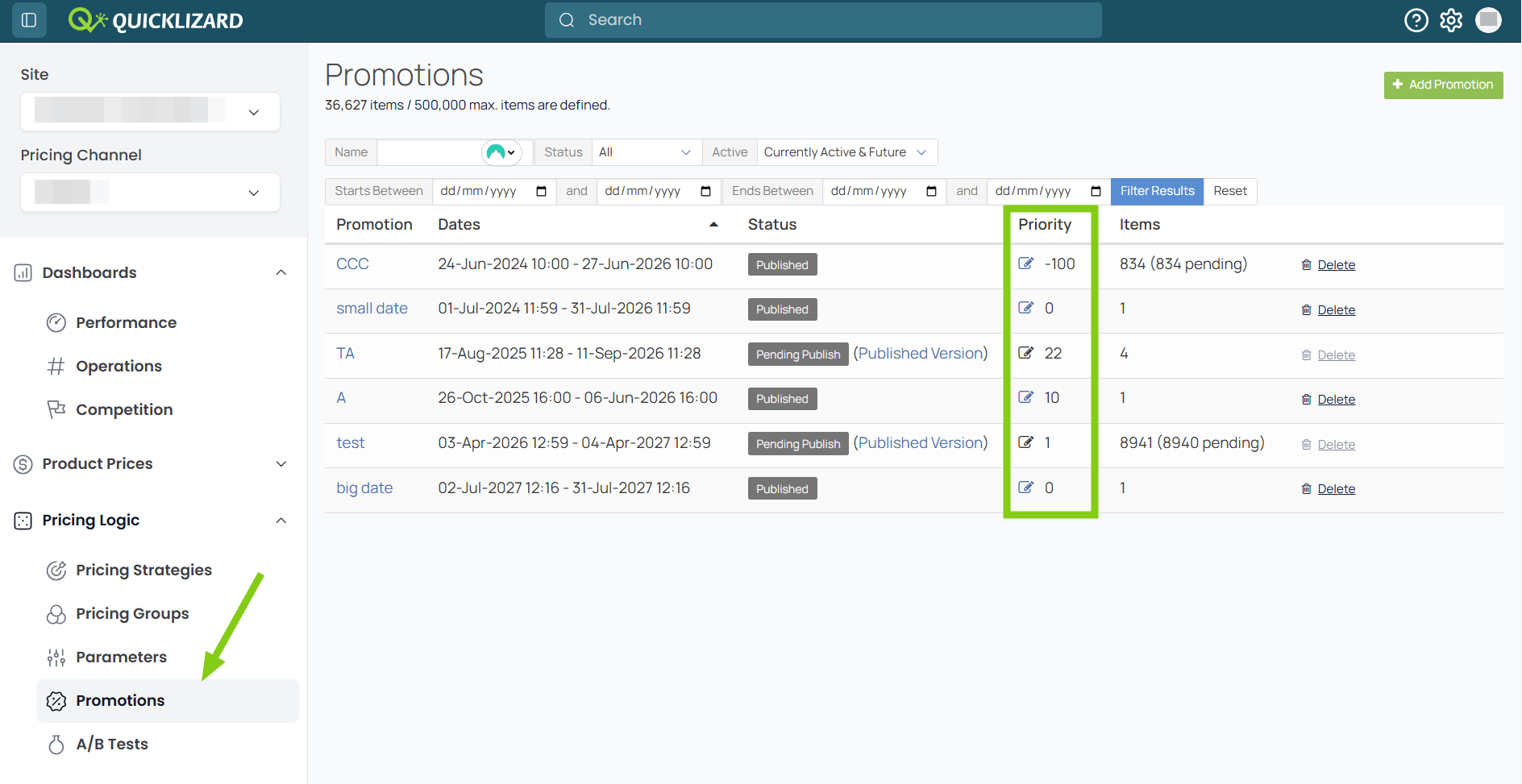
What this means for you:
🔹Manage Overlapping Promotions. If a product is part of multiple overlapping promotions, the priority will define which promotion is applied.
🔹Default Precedence. When no priority is assigned, the promotion with the earliest start data will take precendence.
February 3, 2026
New UIImprovement
Calculation bar - basic math at your fingertips
See totals and averages directly in the Pricing
Recommendation Page.
What this means for you:
🔹Smart UI Visibility. The Calculation Bar can only be enabled, via the Actions menu, when no products are selected.
🔹Dynamic Summary Statistics. The bar automatically calculates the Sum and Average for your current view, whether this is the full catalog or a specific filtered subset of products.
🔹Filter-Driven Logic. The calculations are intelligently tied to your filters, not your manual selections. This way the bar always provides a holistic view of the filtered segment, maintaining context of the broader impact.
🔹Context-Aware Metrics by Channel. The bar adapts to your position in the Channel Tree to ensure accuracy.
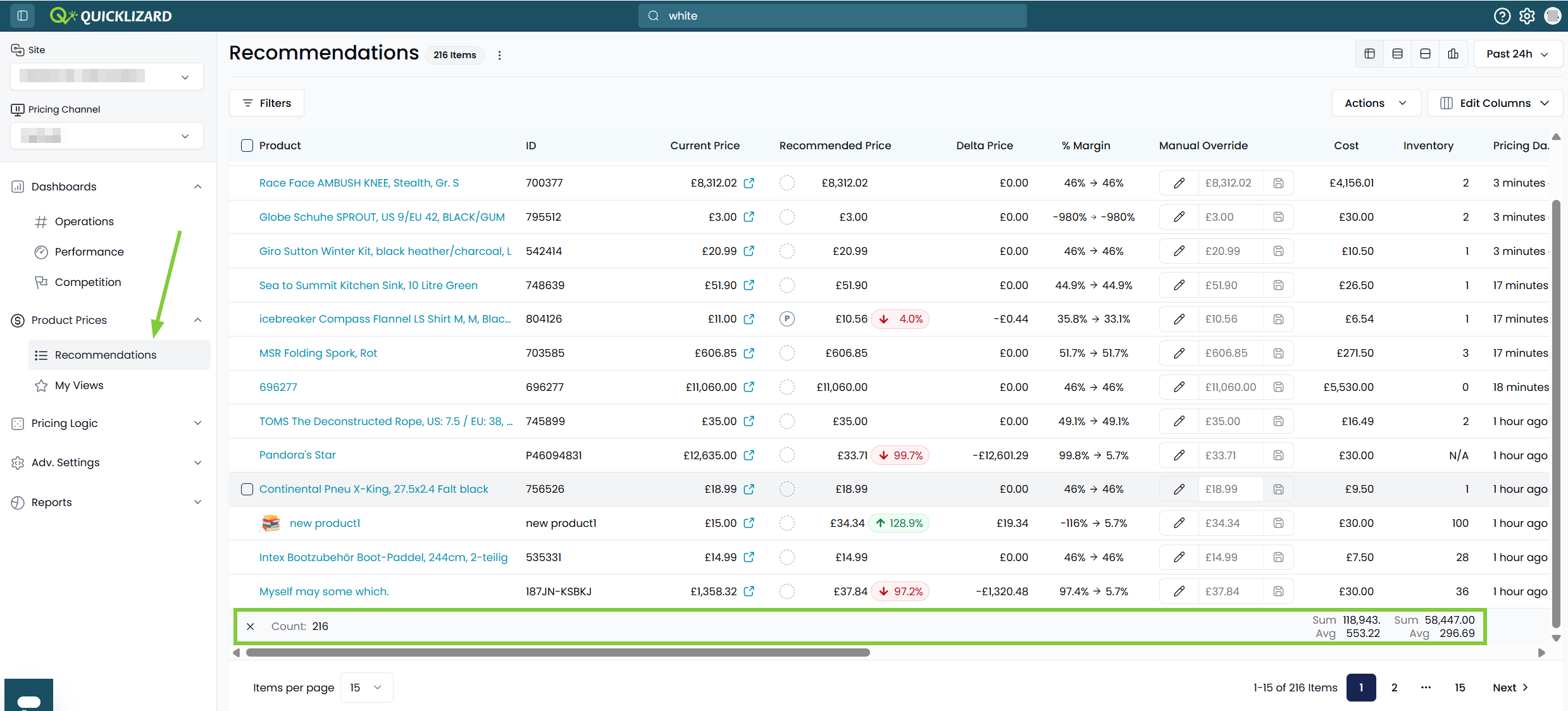
What this means for you:
🔹Smart UI Visibility. The Calculation Bar can only be enabled, via the Actions menu, when no products are selected.
🔹Dynamic Summary Statistics. The bar automatically calculates the Sum and Average for your current view, whether this is the full catalog or a specific filtered subset of products.
🔹Filter-Driven Logic. The calculations are intelligently tied to your filters, not your manual selections. This way the bar always provides a holistic view of the filtered segment, maintaining context of the broader impact.
🔹Context-Aware Metrics by Channel. The bar adapts to your position in the Channel Tree to ensure accuracy.
New UIImprovement
Product Lifecycle & Activity Insights
Stop guessing when or why a price changed. The
new Dates Area provides a clear timeline of
the product’s journey; from its initial creation to its most
recent data sync and pricing trigger.
What this means for you:
🔹Last Action Status. Instantly see when the last recommendation status change occurred, such as an Acceptance or a Price Override.
🔹Data Freshness (Last Update). Track exactly when the core product or competitor data was last refreshed.
🔹Pricing Trigger Intelligence. Understand the "When" and "Why" behind the latest price recommendation.
🔹Product Longevity (Creation Date). Reference exactly when the SKU was first onboarded into the Quicklizard system.
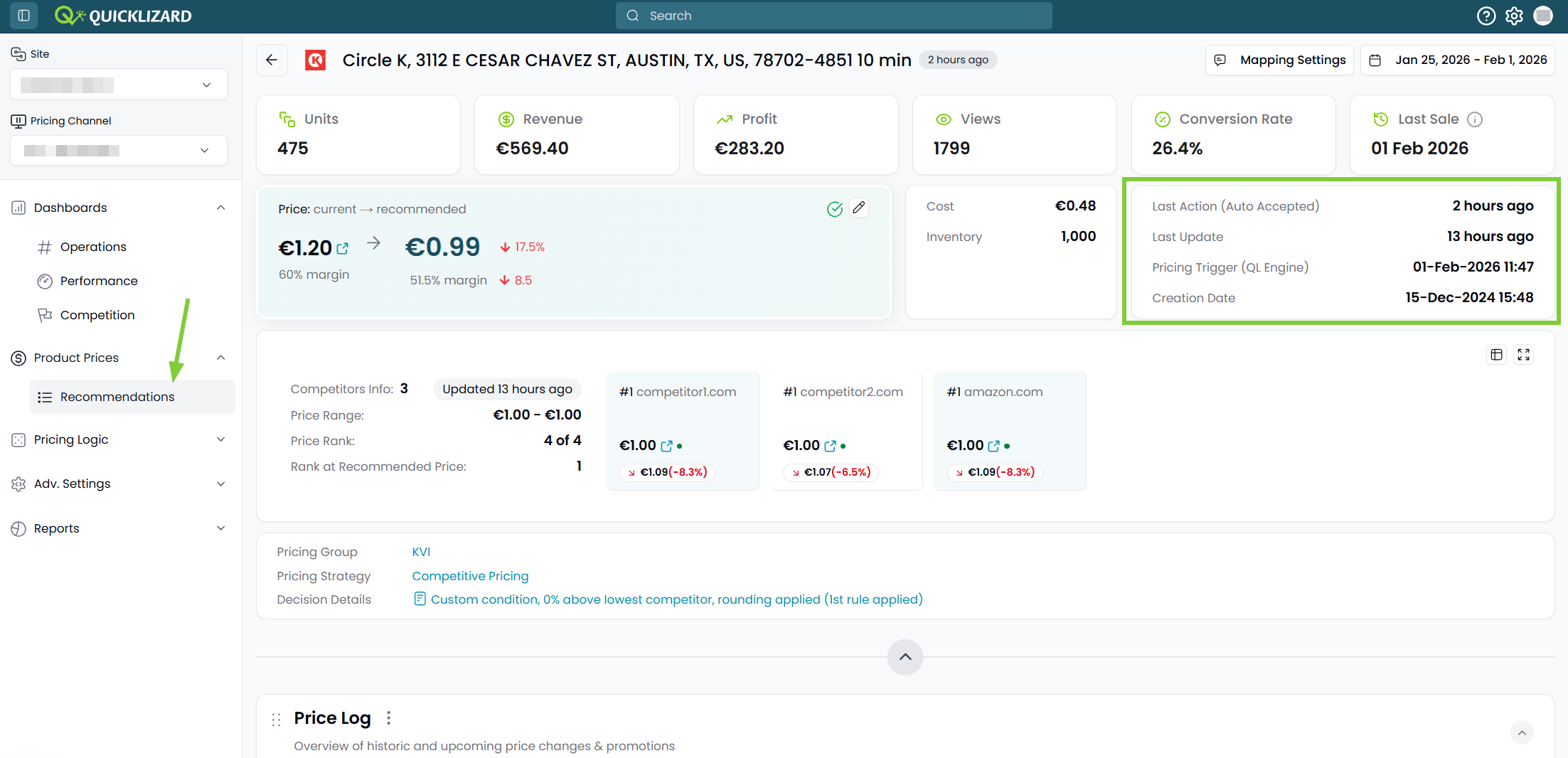
What this means for you:
🔹Last Action Status. Instantly see when the last recommendation status change occurred, such as an Acceptance or a Price Override.
🔹Data Freshness (Last Update). Track exactly when the core product or competitor data was last refreshed.
🔹Pricing Trigger Intelligence. Understand the "When" and "Why" behind the latest price recommendation.
🔹Product Longevity (Creation Date). Reference exactly when the SKU was first onboarded into the Quicklizard system.
January 2026
January 19, 2026
New UIImprovement
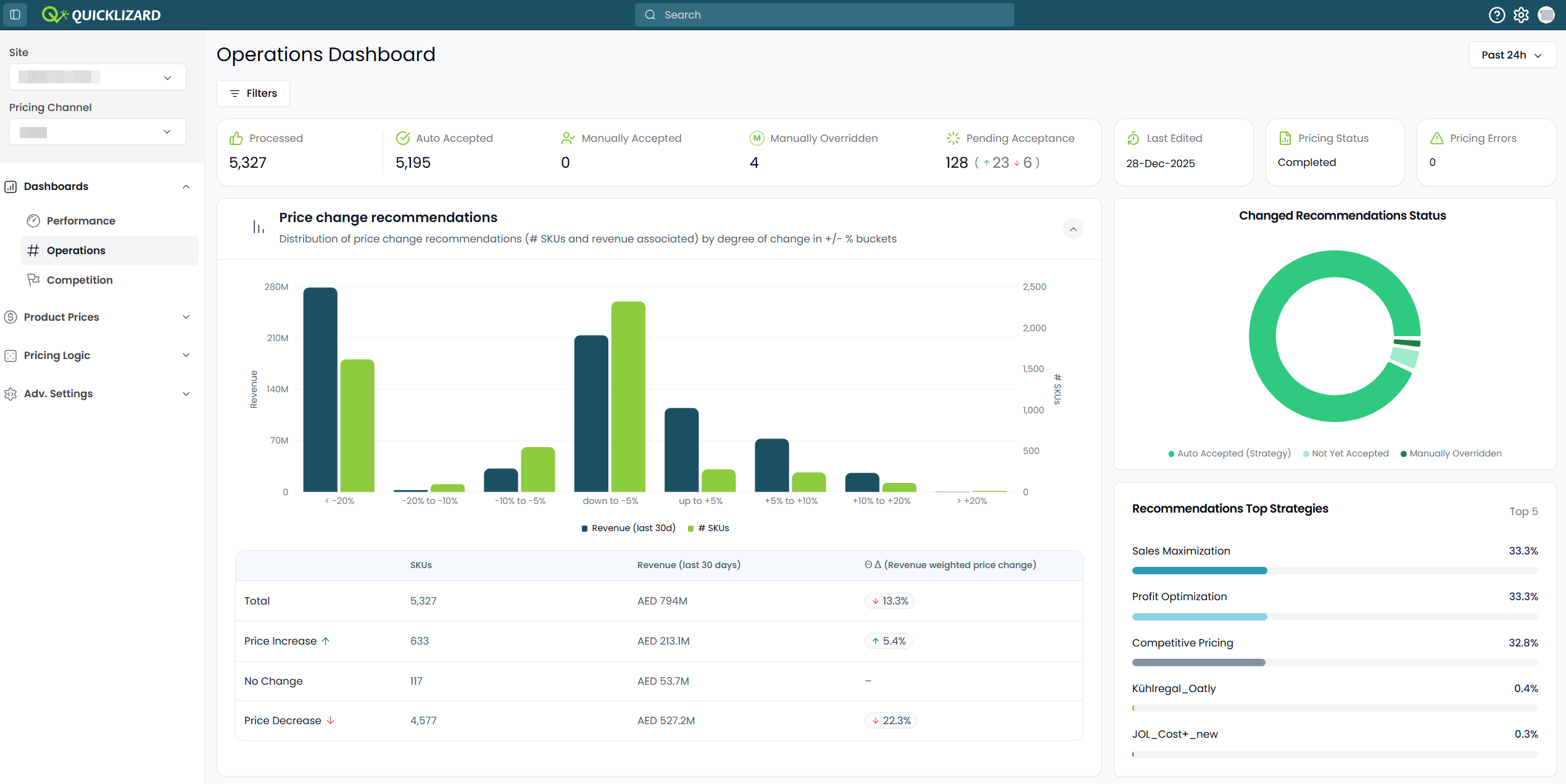
New Operations Dashboard
Gain useful insights into the generated recommendations,
by using the updated Operations Dashboard.
What this means for you:
🔹 See in one glance how many recommendations still require action to be taken, i.e. are pending acceptance
🔹 Use the filter option to drill down into specific parts of your assortment
🔹 Understand the distribution of recommendations with price changes
The Operations Dashboard only shows data related to the recommendations that a user has access to see and process.
Learn more ➝
What this means for you:
🔹 See in one glance how many recommendations still require action to be taken, i.e. are pending acceptance
🔹 Use the filter option to drill down into specific parts of your assortment
🔹 Understand the distribution of recommendations with price changes
The Operations Dashboard only shows data related to the recommendations that a user has access to see and process.
Learn more ➝
January 12, 2026
Improvement
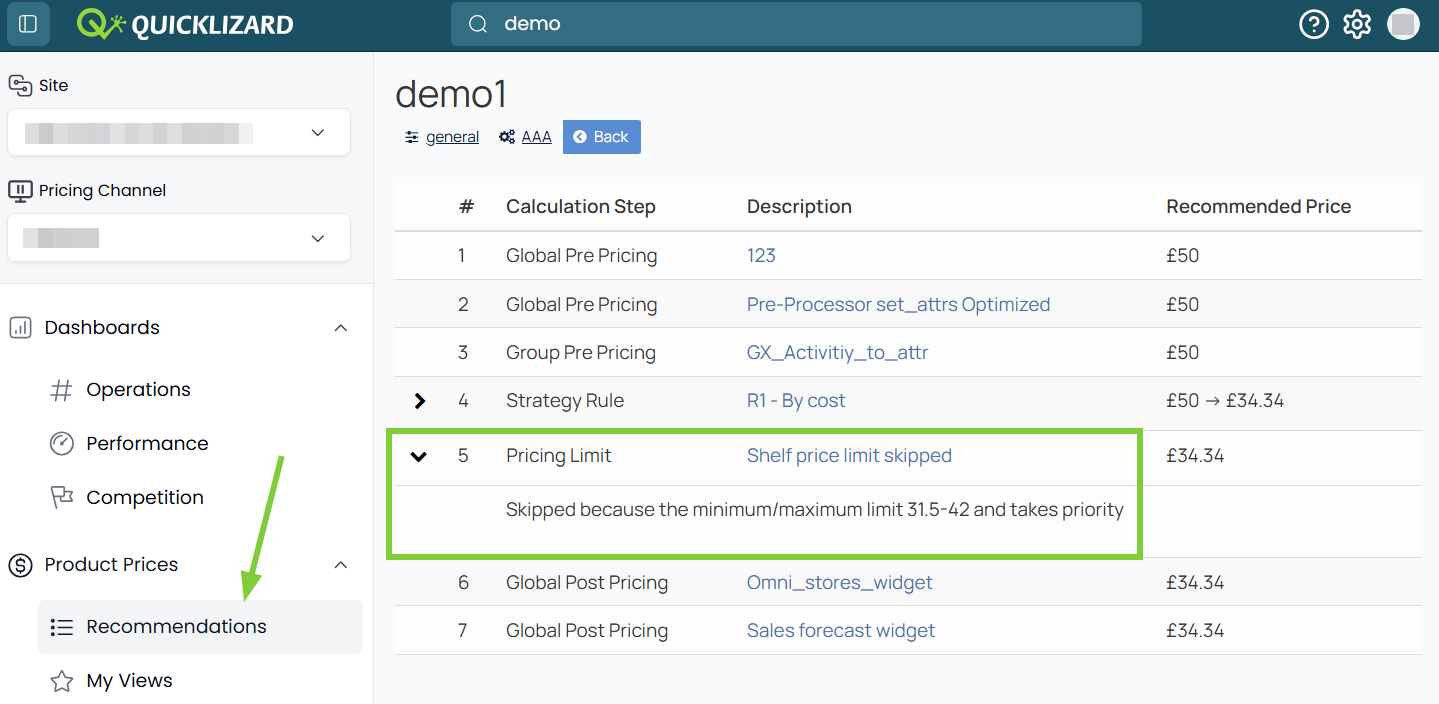
Enhanced Transparency in Pricing Logic
Understand
how your price recommendation was generated
and identify if a pricing limit was skipped
in the process.
Why this matters:
🔹Eliminate the "black box" feel. Gain full confidence in your pricing strategy by seeing the exact logic path and limit-checks used for every recommendation.
🔹The Decision Details now explicitly includes the Pricing Limit step.
🔹You can access the Decision Details both from the Pricing Recommendations Page or the Product Description Page.
Why this matters:
🔹Eliminate the "black box" feel. Gain full confidence in your pricing strategy by seeing the exact logic path and limit-checks used for every recommendation.
🔹The Decision Details now explicitly includes the Pricing Limit step.
🔹You can access the Decision Details both from the Pricing Recommendations Page or the Product Description Page.
New UIImprovement
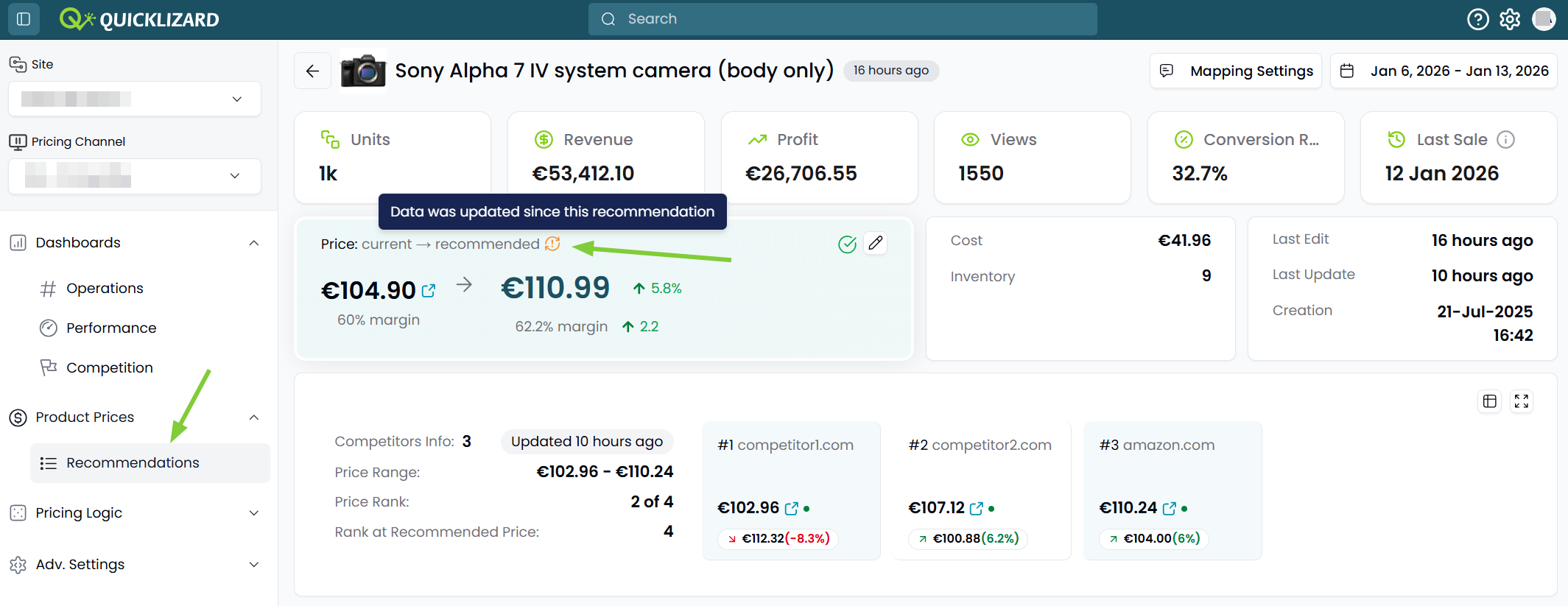
Real-Time Data Sync Status
A new visual indicator alerts you if product
or competitor
data
was updated, without generating a new product recommendation.
Why this matters:
🔹Trust your recommendations. Instantly know if your price recommendations are based on the latest data, giving you the confidence to approve them or the insight to re-generate them for maximum accuracy.
🔹Look for the new "Out-of-Sync" icon to identify when the underlying data is newer than the recommended price.
was updated, without generating a new product recommendation.
Why this matters:
🔹Trust your recommendations. Instantly know if your price recommendations are based on the latest data, giving you the confidence to approve them or the insight to re-generate them for maximum accuracy.
🔹Look for the new "Out-of-Sync" icon to identify when the underlying data is newer than the recommended price.
New UIImprovement
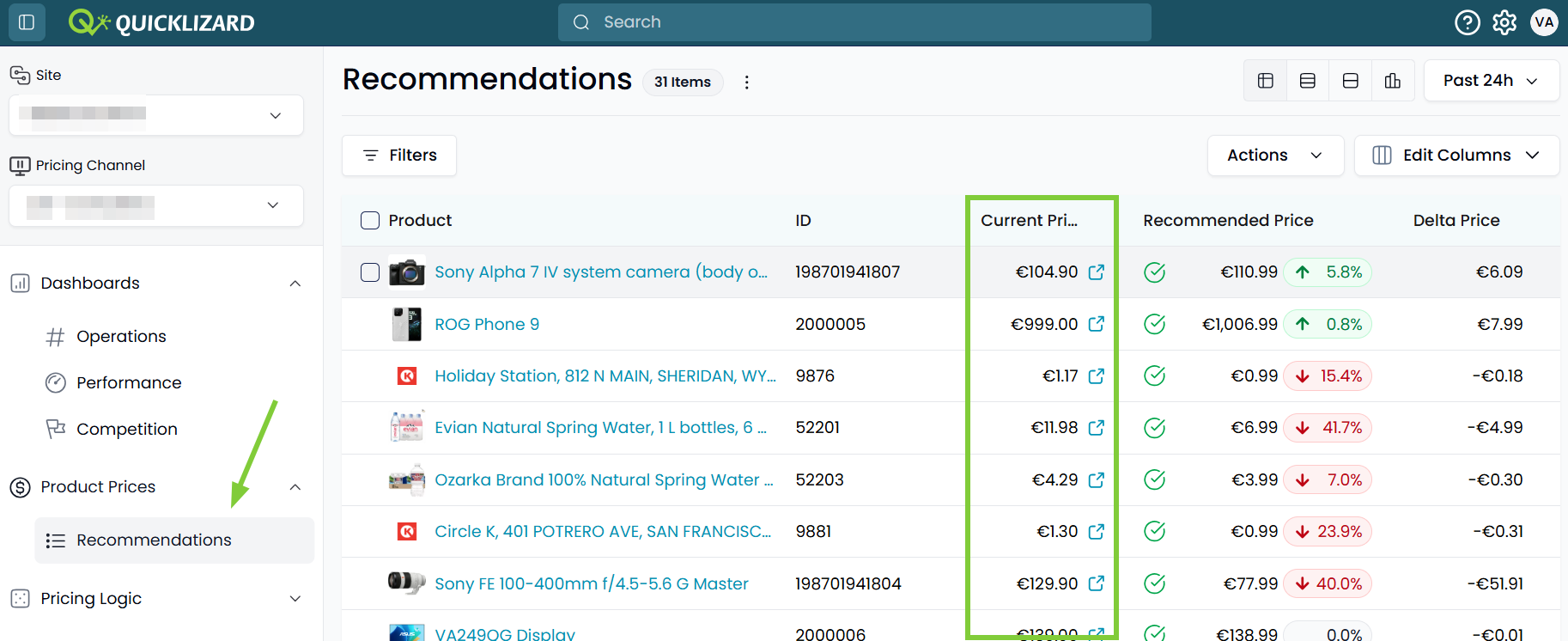
Access your webshop pages
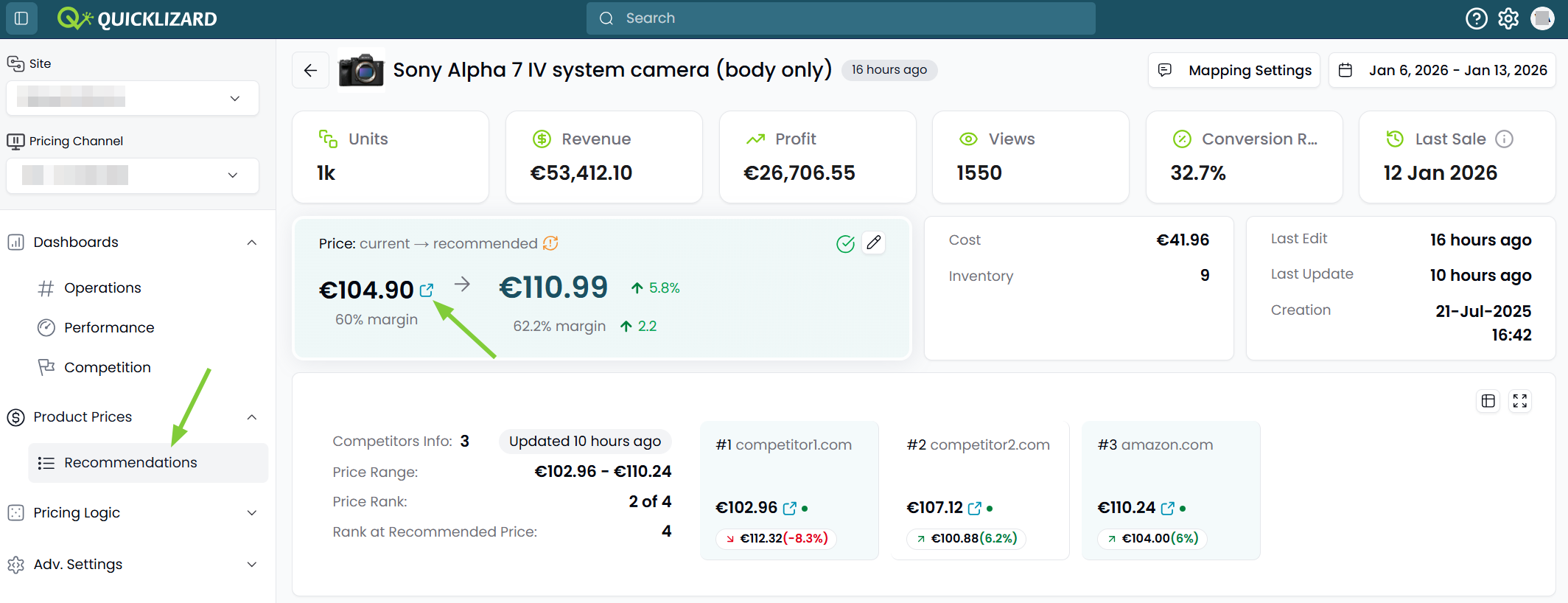
Direct links to your live webshop pages are
now integrated within the Quicklizard interface.
What this means for you:
🔹Streamline your workflow. Instantly verify how your prices appear to customers without manually searching your website, saving you time.
🔹Click the icon in the Current Price column, to open your external product page in a new tab.
🔹The icon is available in all views of the Pricing Recommendations Page and on the Product Description Page.
What this means for you:
🔹Streamline your workflow. Instantly verify how your prices appear to customers without manually searching your website, saving you time.
🔹Click the icon in the Current Price column, to open your external product page in a new tab.
🔹The icon is available in all views of the Pricing Recommendations Page and on the Product Description Page.
New UIImprovement
Price Comparison Site Visibility
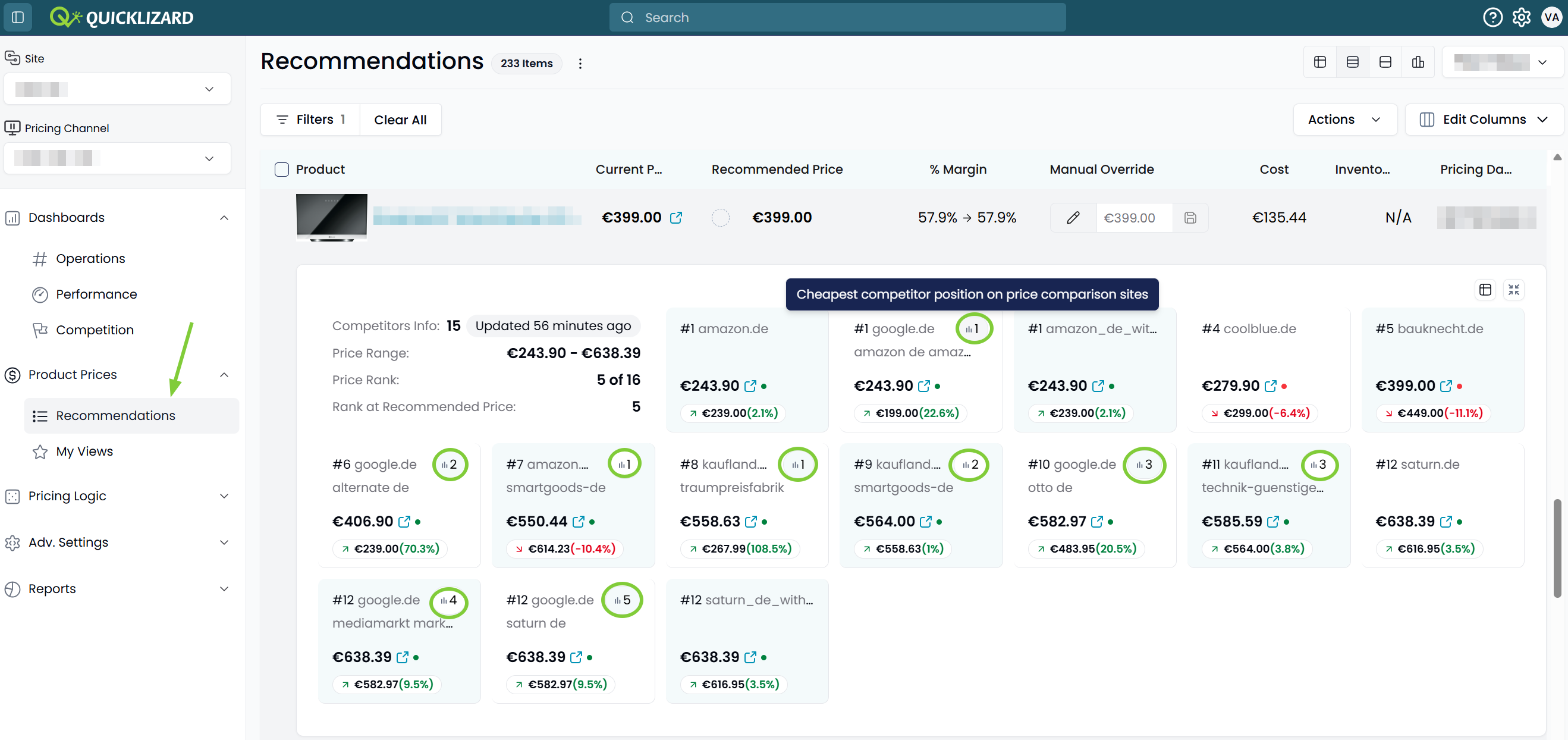
New badges identify which competitor prices
originate from a Price Comparison Site versus
direct competitors.
Why this matters:
🔹Sharpen your competitive intelligence. Differentiate between "marketplace" prices and "direct" competitor prices at a glance to tailor your response to different sales channels.
🔹The Position Badge is shown for prices from Price Comparison Sites, both in the Tile View and on the Product Description Page
Why this matters:
🔹Sharpen your competitive intelligence. Differentiate between "marketplace" prices and "direct" competitor prices at a glance to tailor your response to different sales channels.
🔹The Position Badge is shown for prices from Price Comparison Sites, both in the Tile View and on the Product Description Page
New UIImprovement
Card Duplication on Product Description Page
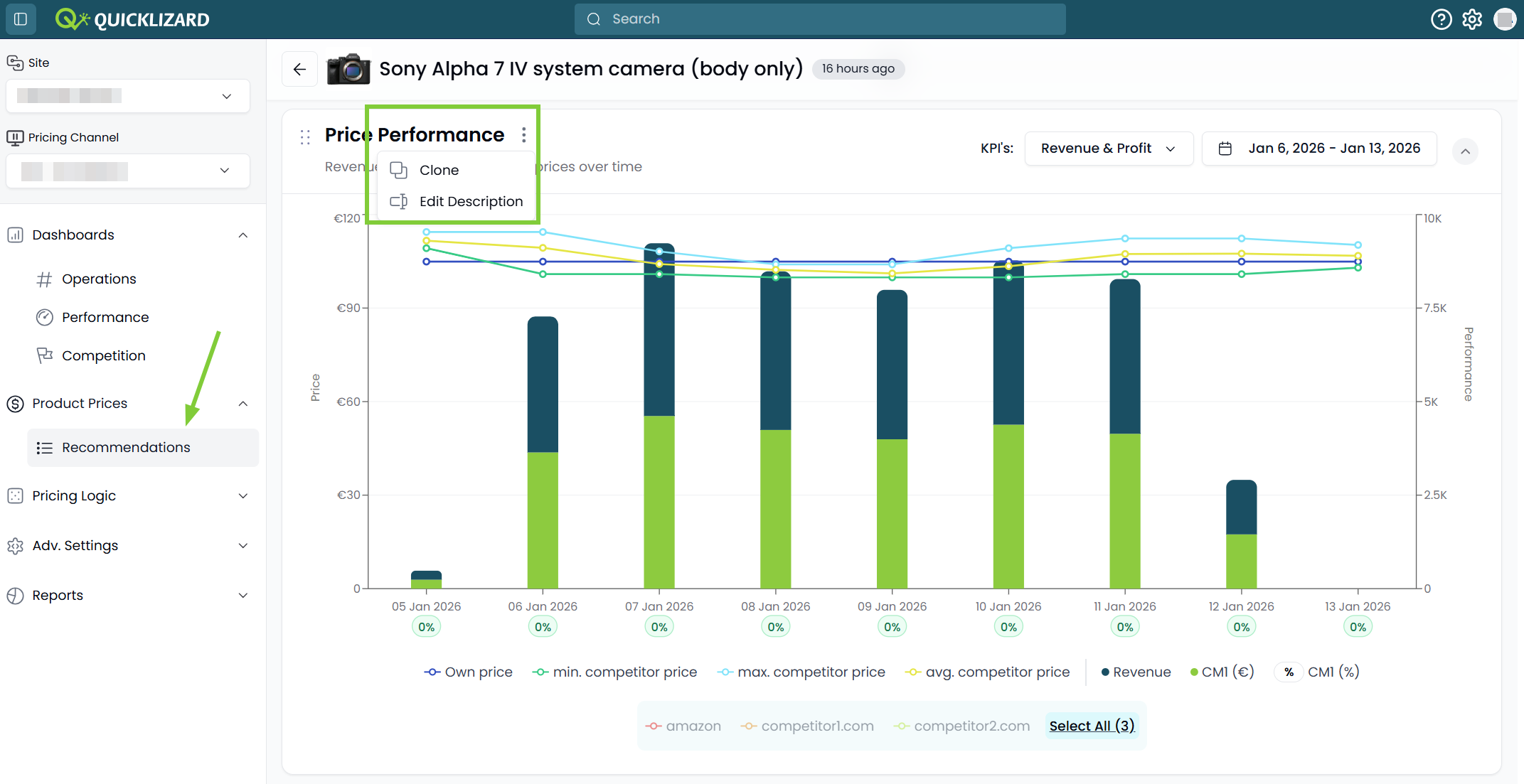
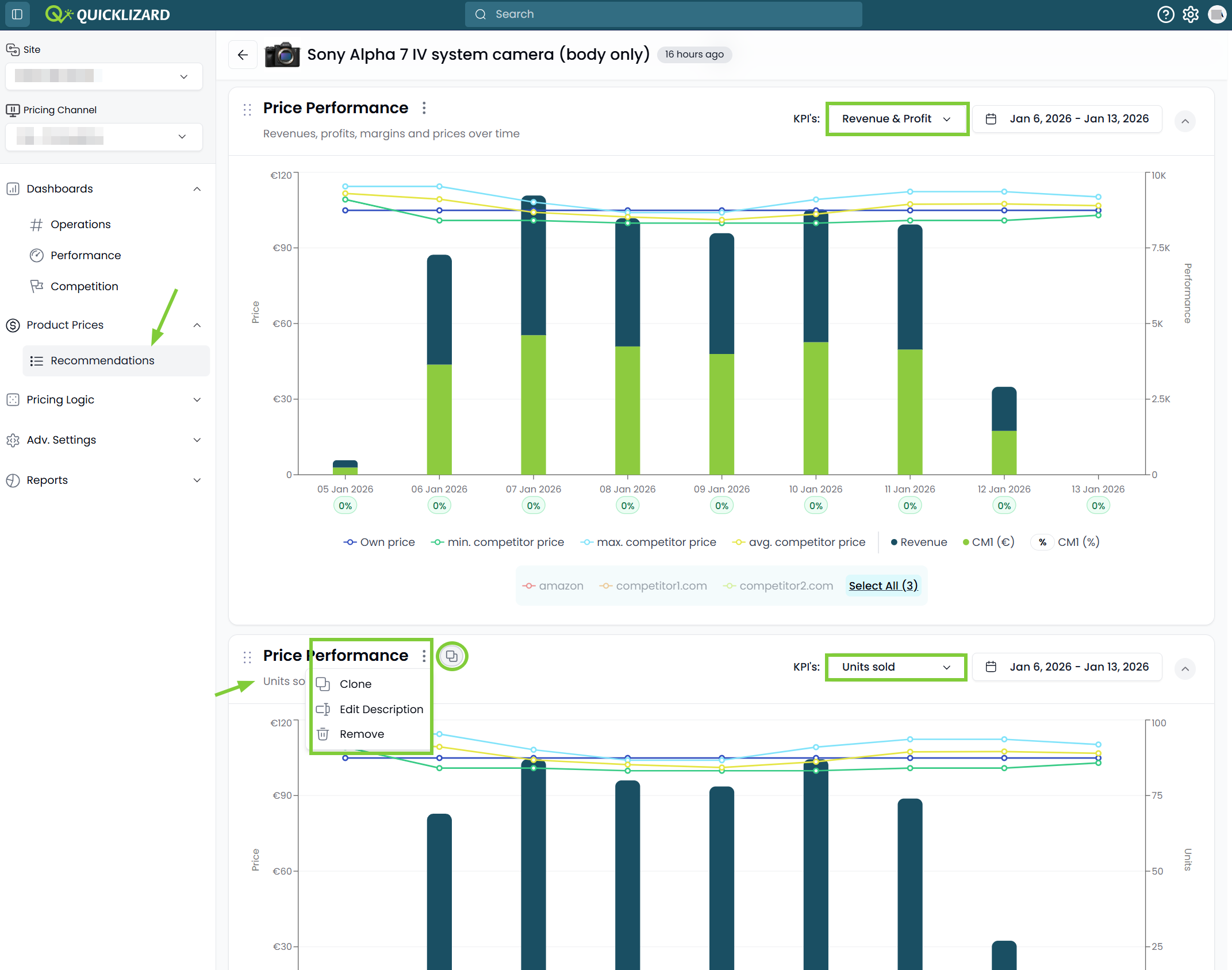
You can now duplicate and customize cards (graphs
or tables) on the Product Description Page.
What this means for you:
🔹Personalized data storytelling. Save time by duplicating a base chart and applying different filters to compare trends side-by-side without starting from scratch.
🔹Use the 'Clone' option on any card to create a copy for further customization.
🔹Cloned cards can be easily identified and removed.
What this means for you:
🔹Personalized data storytelling. Save time by duplicating a base chart and applying different filters to compare trends side-by-side without starting from scratch.
🔹Use the 'Clone' option on any card to create a copy for further customization.
🔹Cloned cards can be easily identified and removed.
Link to 2025 Product updates.
Comments
0 comments
Please sign in to leave a comment.